Wasabi Account Control Manager (WACM) is a centralized platform for managing Wasabi cloud storage at scale. From a single interface, you provision and administer storage accounts for your end customers, resellers, or business units, and consolidate usage across every account.
Your WACM account is separate from your Wasabi Console account. Sign in to WACM at wacm.wasabisys.com using the password you just created — this is a different password from your Wasabi Console, even if both use the same email.
Enabling WACM on Your Wasabi Account
You activate WACM from the Wasabi Console. If the Wasabi Account Control Manager section is in your console settings, you are ready to activate. If it is not there yet, Wasabi Sales can add it to your account.
New to Wasabi?
Sign up for a free trial at wasabi.com, then contact Wasabi Sales and let them know you want to use WACM. Sales will enable it on your account. Once WACM is enabled, the Wasabi Account Control Manager section appears in your console settings and you can activate it.
Already have a Wasabi account?
Sign in to the Wasabi Console and look under your console settings:
If you see the Wasabi Account Control Manager section, follow the steps in Activate WACM.
If you do not see it, contact Wasabi Sales or your Wasabi account representative to enable it.
Activating WACM
After you initiate activation from your Wasabi console, an activation email is sent to the Control Account Admin. Complete activation with these steps:
Click Verify your email address. You will be prompted to set a password.
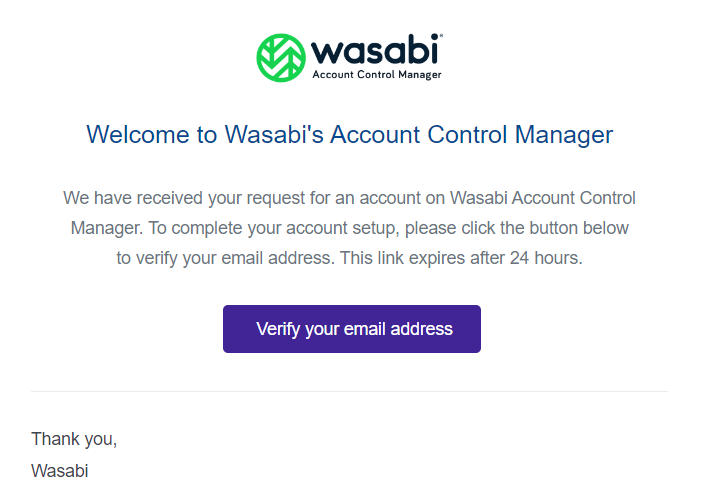
If your verification email expires after 24 hours, click Verify to resend it. Once the email is resent, you will be able to verify your email successfully.
Enter and confirm a new password. Then, check to accept the Wasabi Account Control Manager Terms and Conditions.
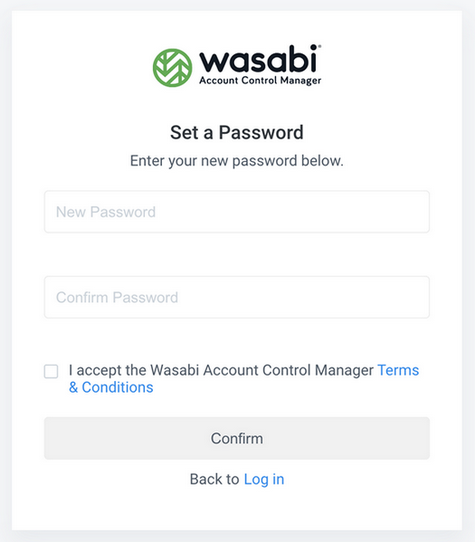
Click Confirm. Your account is now activated, and you are ready to sign in and begin using WACM.
Technical Support
The Wasabi website has the latest product information, including tools to review system status, download software updates, and review support plans. For additional technical support, use this email address to contact a Wasabi Customer Support representative: support@wasabi.com