WCSM Lite is a free, self-service tool that lets eligible Wasabi customers migrate their data directly from StorJ to Wasabi.
Requirements
To use WCSM Lite self-service, you need to meet these criteria:
You are a paid Wasabi Hot Cloud Storage user. If you do not yet have a Wasabi account, get started with a free trial.
Your data is under 50 TB. If you have 50 TB or more to migrate, WCSM Lite is not the right fit. Contact the WCSM Managed Service Team, and they will handle the migration for you.
How WCSM Lite Works
You will receive a WCSM Lite portal link (wcsmlite.wasabisys.com) along with your login credentials.
Log in to the portal at the link provided.
Start your migration. It begins immediately with no support ticket required.
Using the Portal
Once logged in, you will land on the Migrations page, where every migration job you have run is listed with its status (Failed, Completed, and so on), along with:
Data transferred (for example, 165 KB of 165 KB)
Number of objects moved
Duration
Average transfer speed
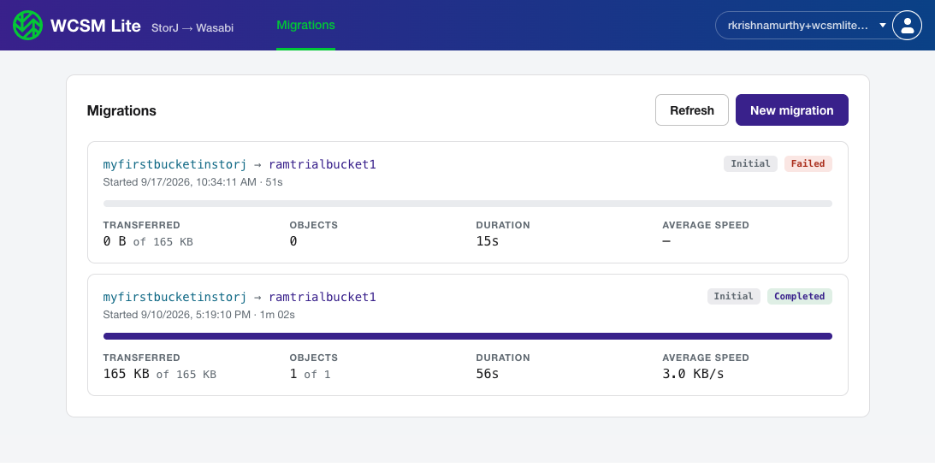
To start a new job, click New migration. The New migration panel is displayed.
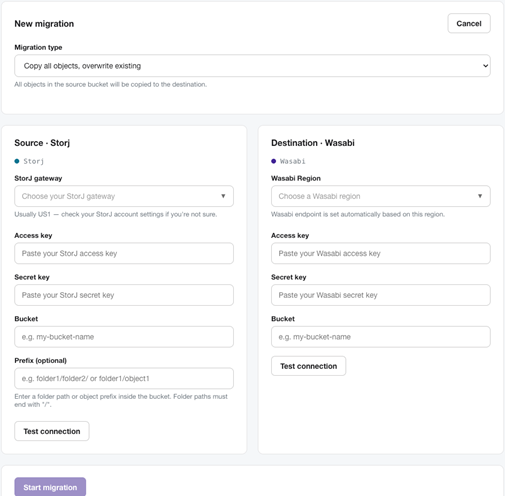
Choose a migration type (for example, Copy all objects, overwriting existing ones at the destination).
Enter your Source - StorJ details: gateway, access key, secret key, bucket name, and an optional prefix if you only want to migrate a specific folder.
Enter your Destination - Wasabi details: region, access key, secret key, and bucket name.
Click Test connection on each side of the panel to confirm your credentials work before starting.
Click Start migration to kick off the transfer.
Tracking Your Migration
Once a migration is running, you can return to the Migrations page any time to check real-time progress—no need to guess or wait for a status email. Click Refresh to pull the latest numbers.
FAQs
The "Prepare report" button is grayed out. Is something wrong?
No, this is expected. The report is being prepared in the background, which is why the button is grayed out and unclickable. Wait about 10 minutes. The button will become active once the report is ready.
I am using a folder/object prefix (for example, Folder1/test) to migrate an AP-region bucket, and no objects are being migrated. Why?
This is a known limitation with how object prefixes are handled. This affects AP-region buckets only; EU and US regions are not impacted. If you need to migrate an AP-region bucket with a folder/object prefix, contact the Wasabi Managed Service Team for a managed service option.
My migration report shows Tags as copied (true), but SSE (server-side encryption) as false. Is something wrong with my migration?
No, this is expected behavior and a known limitation of the source system. The Wasabi storage is secure by default, so no additional action is required.