AWS Signature Version 4 allows you to authenticate your requests to AWS resources. Signature Version 4 can be used with Wasabi by pointing the "Host:" header to Wasabi servers. The Signature generation process is explained in detail Amazon S3 API Reference. Below are the instructions to get Signature version 4 working with Wasabi using Java language:
AWS provides a signature calculation example. Download the jar file.
Import the jar files to a project in any one of the Java IDEs such as Eclipse, NetBeans, IntelliJ, and so on.
The above jar file has examples to upload a file to a bucket, retrieve a file from a bucket, generate a pre-signed URL, and to perform a chunked upload
Type in the Wasabi Access Keys, bucket name, and the region name in the "RunAllSamples.java" file:
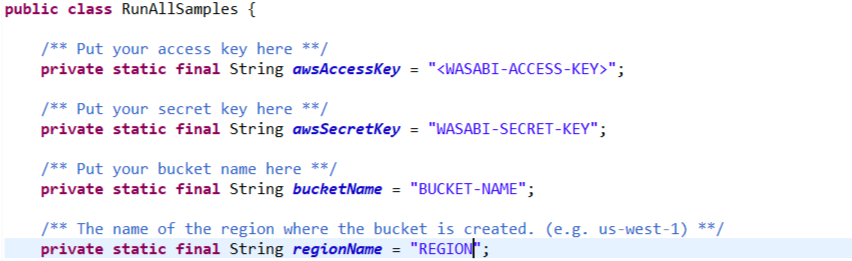
Replace s3.amazonaws.com with s3.wasabisys.com" for the endpointURL variable in the following files:
PutS3ObjectSample.java, GetS3ObjectSample.java, PresignedUrlSample.java, PutS3ObjectChunkedSample.java.

Save all the files and run the RunAllSamples.java file
Note that this example uses Wasabi’s us-east-1 storage region. To use other Wasabi storage regions, use the appropriate Wasabi service URL as described in Service URLs for Wasabi’s Storage Regions.