This article provides practical jq filters for parsing responses from the Wasabi Stats API, including:
Extracting key utilization fields
Exporting results to CSV
Converting bytes to GiB (gibibytes) and GB (gigabytes)
Exporting all fields dynamically to CSV (even when the schema varies)
Requirements
curl installed
jq installed (recommended: v1.6+)
A Stats API response that contains a top-level Records array (the JSON results for a stats API utilization by bucket name query).
If you plan to run these commands on Windows, you'll need to use Git Bash or set up Ubuntu or another Linux-based distribution through Windows Subsystem for Linux (WSL). The curl and jq commands don't work correctly in Windows Command Prompt or PowerShell.
Example: Stats API Call (30 Days of Bucket Utilizations)
Use the following command to retrieve 30 days of utilization for a specific bucket name:
curl --location 'https://stats.wasabisys.com/v1/standalone/utilizations/bucket/01-kent-bucket-test?from=2026-01-02&to=2026-01-31' --header 'Authorization: <Access Key>:<Secret Key>'The following example is formatted for readability.
curl --location \
  'https://stats.wasabisys.com/v1/standalone/utilizations/bucket/01-kent-bucket-test?from=2026-01-02&to=2026-01-31' \
  --header 'Authorization: <Access Key>:<Secret Key>'
Tip: To immediately convert the API response to CSV or raw output, pipe the response to one of the jq commands below:
curl -L "https://..." \
  -H "Authorization: <AccessKey>:<SecretKey>" | jq -r '...'
These commands can all be redirected to a file for future use; for example, CSV files can be opened in MS Excel.
Common jq Outputs for Stats API Responses
The following jq commands (and their outputs) are commonly used to process data returned by a Stats API.
Example 1: Extract key utilization fields (display selected fields as arrays)
Use the following command to quickly view specific fields in a structured format (not CSV).
curl --location 'https://stats.wasabisys.com/v1/standalone/utilizations/bucket/01-kent-bucket-test?from=2026-01-02&to=2026-01-31' --header 'Authorization: <access-key>:<secret-key>' | jq -r '(["Bucket", "EndTime", "RawStorageSizeBytes", "PaddedStorageSizeBytes", "DeletedStorageSizeBytes"]), (.Records[] | [.Bucket, .EndTime, .RawStorageSizeBytes, .PaddedStorageSizeBytes, .DeletedStorageSizeBytes])'The following example is formatted for readability.
curl --location \
  'https://stats.wasabisys.com/v1/standalone/utilizations/bucket/01-kent-bucket-test?from=2026-01-02&to=2026-01-31' \
  --header 'Authorization: <access-key>:<secret-key>' \
| jq -r '
  ([
    "Bucket",
    "EndTime",
    "RawStorageSizeBytes",
    "PaddedStorageSizeBytes",
    "DeletedStorageSizeBytes"
  ]),
  (
    .Records[] |
    [
      .Bucket,
      .EndTime,
      .RawStorageSizeBytes,
      .PaddedStorageSizeBytes,
      .DeletedStorageSizeBytes
    ]
  )
'
Example 2: Export key utilization fields to CSV (with header)
Use the following command to obtain clean CSV output.
curl --location 'https://stats.wasabisys.com/v1/standalone/utilizations/bucket/01-kent-bucket-test?from=2026-01-02&to=2026-01-31' --header 'Authorization:<access-key>:<secret-key>'| jq -r '(["Bucket", "EndTime", "RawStorageSizeBytes", "PaddedStorageSizeBytes", "DeletedStorageSizeBytes"]), (.Records[] | [.Bucket, .EndTime, .RawStorageSizeBytes, .PaddedStorageSizeBytes, .DeletedStorageSizeBytes ])| @csv'The following example is formatted for readability.
curl --location \
  'https://stats.wasabisys.com/v1/standalone/utilizations/bucket/01-kent-bucket-test?from=2026-01-02&to=2026-01-31' \
  --header 'Authorization: <access-key>:<secret-key>' \
| jq -r '
  ([
    "Bucket",
    "EndTime",
    "RawStorageSizeBytes",
    "PaddedStorageSizeBytes",
    "DeletedStorageSizeBytes"
  ]),
  (
    .Records[] |
    [
      .Bucket,
      .EndTime,
      .RawStorageSizeBytes,
      .PaddedStorageSizeBytes,
      .DeletedStorageSizeBytes
    ]
  )
  | @csv
'
Unit Conversions
The following examples show how units are converted when working with storage data.
Notes on Units
GiB (gibibytes) uses a base of 1024: GiB = bytes / (1024^3)
GB (gigabytes) uses a base of 1000: GB = bytes / (1000^3)
Example 3: CSV + convert bytes to GiB (rounded to 3 decimals)
curl --location 'https://stats.wasabisys.com/v1/standalone/utilizations/bucket/01-kent-bucket-test?from=2026-01-02&to=2026-01-31' --header 'Authorization:<access-key>:<secret-key>SecretKeyqqqqqqqas12345566788'| jq -r '["Bucket", "EndTime", "RawStorageSizeGiB", "PaddedStorageSizeGiB", "DeletedStorageSizeGiB"], (.Records[] | [.Bucket, .EndTime, ((.RawStorageSizeBytes/(1024*1024*1024))*1000|round/1000), ((.PaddedStorageSizeBytes/(1024*1024*1024))*1000|round/1000), ((.DeletedStorageSizeBytes/(1024*1024*1024))*1000|round/1000) ]) | @csv'The following example is formatted for readability.
curl --location \
  'https://stats.wasabisys.com/v1/standalone/utilizations/bucket/01-kent-bucket-test?from=2026-01-02&to=2026-01-31' \
  --header 'Authorization: <access-key>:<secret-key>' \
| jq -r '
  ([
    "Bucket",
    "EndTime",
    "RawStorageSizeGiB",
    "PaddedStorageSizeGiB",
    "DeletedStorageSizeGiB"
  ]),
  (
    .Records[] |
    [
      .Bucket,
      .EndTime,
      ((.RawStorageSizeBytes / 1073741824) * 1000 | round / 1000),
      ((.PaddedStorageSizeBytes / 1073741824) * 1000 | round / 1000),
      ((.DeletedStorageSizeBytes / 1073741824) * 1000 | round / 1000)
    ]
  )
  | @csv
'
Example 4: CSV + convert bytes to GiB (no rounding)
curl --location 'https://stats.wasabisys.com/v1/standalone/utilizations/bucket/01-kent-bucket-test?from=2026-01-02&to=2026-01-31' --header 'Authorization:<access-key>:<secret-key>| jq -r '(["Bucket", "EndTime", "RawStorageSizeGiB", "PaddedStorageSizeGiB", "DeletedStorageSizeGiB"], (.Records[] | [.Bucket, .EndTime, (.RawStorageSizeBytes/(1024*1024*1024)), (.PaddedStorageSizeBytes/(1024*1024*1024)), (.DeletedStorageSizeBytes/(1024*1024*1024)) ])) | @csv'The following example is formatted for readability.
curl --location \
  'https://stats.wasabisys.com/v1/standalone/utilizations/bucket/01-kent-bucket-test?from=2026-01-02&to=2026-01-31' \
  --header 'Authorization: <access-key>:<secret-key>' \
| jq -r '
  ([
    "Bucket",
    "EndTime",
    "RawStorageSizeGiB",
    "PaddedStorageSizeGiB",
    "DeletedStorageSizeGiB"
  ]),
  (
    .Records[] |
    [
      .Bucket,
      .EndTime,
      (.RawStorageSizeBytes / (1024 * 1024 * 1024)),
      (.PaddedStorageSizeBytes / (1024 * 1024 * 1024)),
      (.DeletedStorageSizeBytes / (1024 * 1024 * 1024))
    ]
  )
  | @csv
'
Example 5: CSV + convert bytes to GB (rounded to 3 decimals)
curl --location 'https://stats.wasabisys.com/v1/standalone/utilizations/bucket/01-kent-bucket-test?from=2026-01-02&to=2026-01-31' --header 'Authorization:<access-key>:<secret-key>'| jq -r '(["Bucket", "EndTime", "RawStorageSizeGB", "PaddedStorageSizeGB", "DeletedStorageSizeGB"], (.Records[] | [.Bucket, .EndTime, ((.RawStorageSizeBytes/(1000*1000*1000))*1000|round/1000), ((.PaddedStorageSizeBytes/(1000*1000*1000))*1000|round/1000), ((.DeletedStorageSizeBytes/(1000*1000*1000))*1000|round/1000) ])) | @csv'The following example is formatted for readability.
curl --location \
  'https://stats.wasabisys.com/v1/standalone/utilizations/bucket/01-kent-bucket-test?from=2026-01-02&to=2026-01-31' \
  --header 'Authorization: <access-key>:<secret-key>' \
| jq -r '
  ([
    "Bucket",
    "EndTime",
    "RawStorageSizeGB",
    "PaddedStorageSizeGB",
    "DeletedStorageSizeGB"
  ]),
  (
    .Records[] |
    [
      .Bucket,
      .EndTime,
      ((.RawStorageSizeBytes / (1000 * 1000 * 1000)) * 1000 | round / 1000),
      ((.PaddedStorageSizeBytes / (1000 * 1000 * 1000)) * 1000 | round / 1000),
      ((.DeletedStorageSizeBytes / (1000 * 1000 * 1000)) * 1000 | round / 1000)
    ]
  )
  | @csv
'
Example 6: CSV + convert bytes to GB (no rounding)
curl --location 'https://stats.wasabisys.com/v1/standalone/utilizations/bucket/01-kent-bucket-test?from=2026-01-02&to=2026-01-31' --header 'Authorization:<access-key>:<secret-key>'| jq -r '(["Bucket", "EndTime", "RawStorageSizeGB", "PaddedStorageSizeGB", "DeletedStorageSizeGB"], (.Records[] | [.Bucket, .EndTime, (.RawStorageSizeBytes/(1024*1024*1024)), (.PaddedStorageSizeBytes/(1000*1000*1000)), (.DeletedStorageSizeBytes/(1000*1000*1000)) ])) | @csv'The following example is formatted for readability.
curl --location \
  'https://stats.wasabisys.com/v1/standalone/utilizations/bucket/01-kent-bucket-test?from=2026-01-02&to=2026-01-31' \
  --header 'Authorization: <access-key>:<secret-key>' \
| jq -r '
  ([
    "Bucket",
    "EndTime",
    "RawStorageSizeGB",
    "PaddedStorageSizeGB",
    "DeletedStorageSizeGB"
  ]),
  (
    .Records[] |
    [
      .Bucket,
      .EndTime,
      (.RawStorageSizeBytes / (1000 * 1000 * 1000)),
      (.PaddedStorageSizeBytes / (1000 * 1000 * 1000)),
      (.DeletedStorageSizeBytes / (1000 * 1000 * 1000))
    ]
  )
  | @csv
'
Export All Fields from a Stats API Response to CSV (Dynamic Columns)
Use the following command if the fields in Records vary or if you want all information in the output. It automatically generates a column list from all keys across all records.
curl --location 'https://stats.wasabisys.com/v1/standalone/utilizations/bucket/01-kent-bucket-test?from=2026-01-02&to=2026-01-31' --header 'Authorization:<access-key>:<secret-key>'|jq -r '(.Records | map(keys) | add | unique | sort) as $cols | ($cols | @csv), (.Records[] | [ $cols[] as $c | .[$c] ] | @csv)'The following example is formatted for readability.
curl --location \
  'https://stats.wasabisys.com/v1/standalone/utilizations/bucket/01-kent-bucket-test?from=2026-01-02&to=2026-01-31' \
  --header 'Authorization: <access-key>:<secret-key>' \
| jq -r '
  (.Records | map(keys) | add | unique | sort) as $cols |
  ($cols | @csv),
  (
    .Records[] |
    [
      $cols[] as $c |
      .[$c]
    ] |
    @csv
  )
'
RawStorageSizeBytes vs PaddedStorageSizeBytes
RawStorageSizeBytes is the total number of bytes for all non-deleted (active and versioned) objects stored in the account or bucket. It is the true object-data total, without any minimum-size adjustment.
PaddedStorageSizeBytes is the total number of bytes for all non-deleted (active and versioned) objects after applying Wasabi’s minimum object size billing rule for the plan, which the docs describe as a 4 KB minimum object size. As a result, very small objects are rounded up for billing or accounting purposes.
Pagination Notes
The maximum number of pages in a response is 100.
Querying by month should typically be sufficient to stay within pagination limits.
Use the following command to check page information:
curl --location 'https://stats.wasabisys.com/v1/standalone/utilizations/bucket/01-kent-bucket-test?from=2026-01-02&to=2026-01-31' --header 'Authorization:<access-key>:<secret-key>’| jq '.Records | length'The following example is formatted for readability.
curl --location \
  'https://stats.wasabisys.com/v1/standalone/utilizations/bucket/01-kent-bucket-test?from=2026-01-02&to=2026-01-31' \
  --header 'Authorization: <access-key>:<secret-key>' \
| jq '.Records | length'
Troubleshooting Notes
If jq returns errors such as "Cannot iterate over null," confirm that the response includes a Records array:
curl --location 'https://stats.wasabisys.com/v1/standalone/utilizations/bucket/01-kent-bucket-test?from=2026-01-02&to=2026-01-31' --header 'Authorization: <access-key>:<secret-key>' | jq '.Records | length'The following example is formatted for readability.
curl --location \
  'https://stats.wasabisys.com/v1/standalone/utilizations/bucket/01-kent-bucket-test?from=2026-01-02&to=2026-01-31' \
  --header 'Authorization: <access-key>:<secret-key>' \
| jq '.Records | length'
If the CSV output appears empty, verify that the expected field names are included in the response.
curl --location 'https://stats.wasabisys.com/v1/standalone/utilizations/bucket/01-kent-bucket-test?from=2026-01-02&to=2026-01-31' --header 'Authorization:<access-key>:<secret-key>'| jq '.Records[0]|keys'The following example is formatted for readability.
curl --location \
  'https://stats.wasabisys.com/v1/standalone/utilizations/bucket/01-kent-bucket-test?from=2026-01-02&to=2026-01-31' \
  --header 'Authorization: <access-key>:<secret-key>' \
| jq '
  .Records[0] |
  keys
'
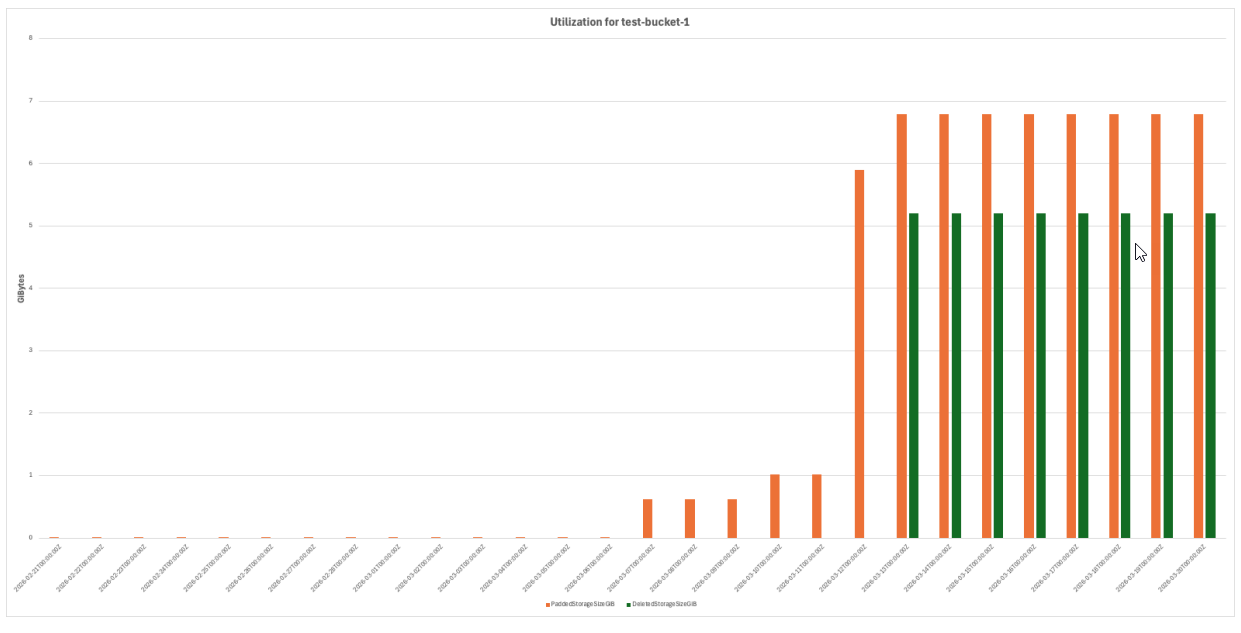
Example Bucket Utilization Chart
The chart below was generated in MS Excel from the CSV results produced by running the commands above against a bucket named test-bucket-1.