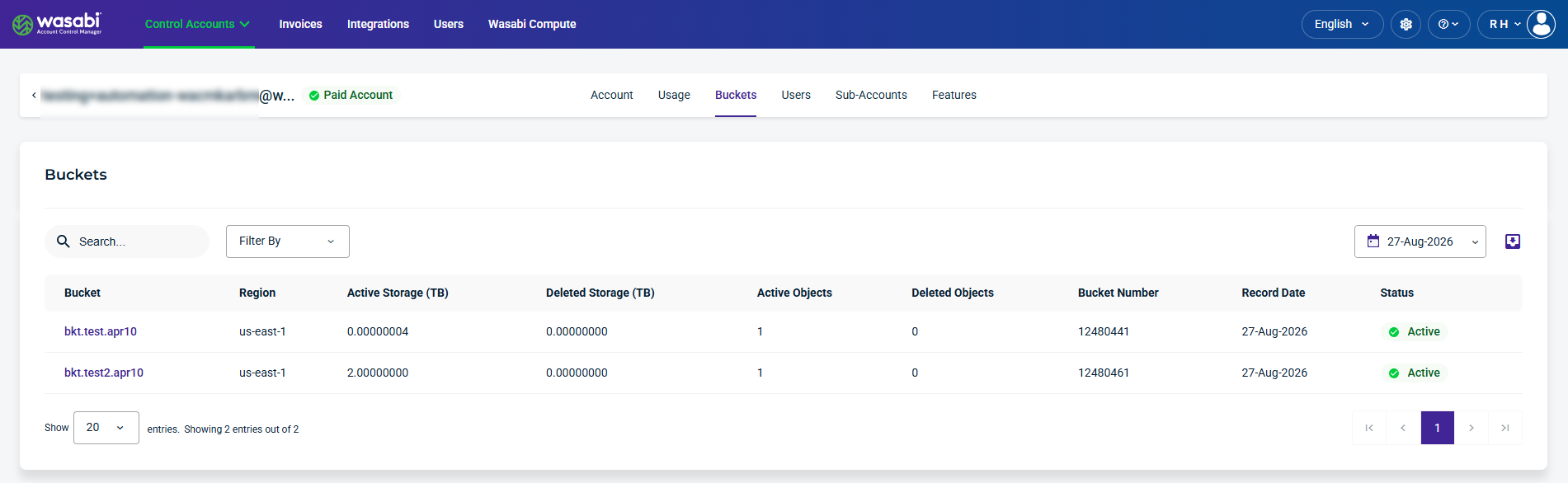
The Buckets page provides a centralized view of buckets for the selected Control Account, including those created in the Wasabi Console and the Custom Cloud Console (CCC). You can view storage and object usage for each bucket, search and filter the list, and select a date to view historical bucket data.
On the Control Accounts page, select a Control Account from the list to view buckets. The Account page opens by default. Select the Buckets tab.
Bucket Details and Metrics
This section lists bucket details and metrics for the Control Account for the selected record date.
Bucket—The name of the bucket.
Region—The Wasabi storage region where the bucket is located.
Active Storage (TB)—The amount of active storage used by the bucket.
Deleted Storage (TB)—The amount of deleted storage associated with the bucket.
Active Objects—The number of active objects stored in the bucket.
Deleted Objects—The number of deleted objects associated with the bucket.
Bucket Number—The unique number associated with the bucket.
Record Date—The date on which the bucket usage data was recorded.
Status—The current status of the bucket, such as Active.
Find and Filter Buckets
Use the Search, Filter By, and calendar tools to find and refine account data displayed on the page. You can also export account data for reporting or further analysis.
Search and Filter Buckets
Use the Search field to find specific buckets and use the Filter By menu to filter specific details.
The following Filter By menu options are available:
Region—Filters buckets by Region.
Bucket Number—Filters buckets by bucket number.
Status—Filters buckets by account status, such as Active or Deactivated.
Select a Date
The calendar dropdown lets you select a date to view historical data.
Export Data
The export tool lets you filter results and export data to CSV, JSON, or Excel.

Additional Bucket Storage Details
Select a Bucket from the list to view additional storage details.

This section lists additional bucket details for a selected bucket.
Start Time—The beginning date and time for the recorded usage period.
End Time—The ending date and time for the recorded usage period.
Active Storage (TB)—The amount of active storage used by the bucket during the usage period.
Deleted Storage (TB)—The amount of deleted storage associated with the bucket during the usage period.
Storage Wrote (TB)—The amount of data written to the bucket during the usage period.
Storage Read (TB)—The amount of data read from the bucket during the usage period.
Active Objects—The number of active objects stored in the bucket.
Deleted Objects—The number of deleted objects associated with the bucket.
Egress (GB)—The volume of data transferred out of the bucket during the usage period.
Ingress (GB)—The volume of data transferred into the bucket during the usage period.
API Calls—The number of API calls made for the bucket during the usage period.