Pay as You Go (Pay-Go) Invoice
The following is an example of a Pay-Go pricing model invoice. This example is provided for illustrative purposes only and does not represent actual pricing or customer billing. It is intended to demonstrate the types of information you may see on your invoice.
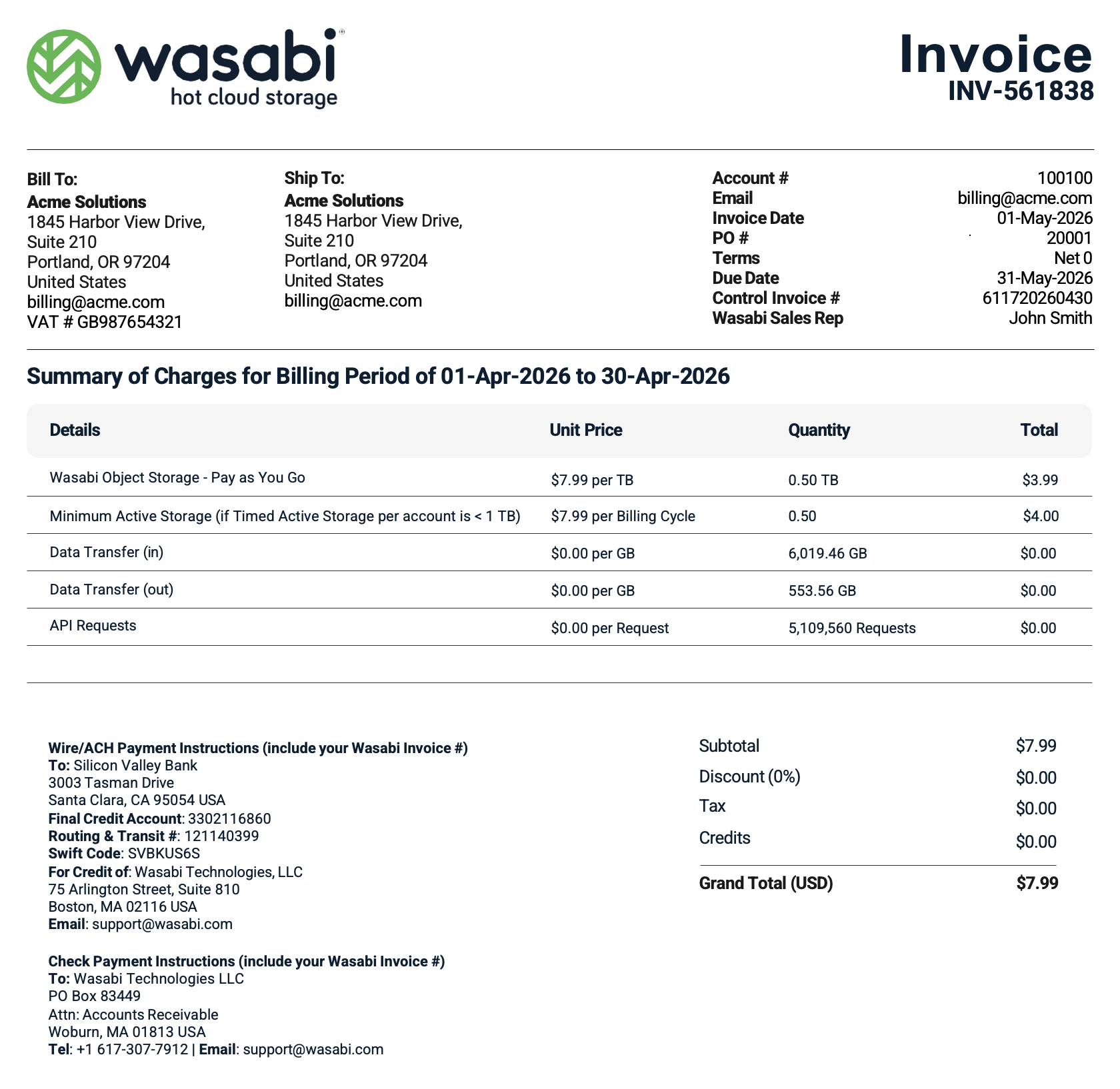
In the Summary of Charges section of the invoice, the following items are broken down by Unit Price, Quantity, and Total:
Wasabi Object Storage – Pay as You Go—This charge represents the amount of Timed Active Storage stored with Wasabi during the billing cycle. The unit price depends on your pricing plan and the storage region(s) you are using. In this example, the unit price is $7.99 per TB. Although invoices display the monthly equivalent rate, Wasabi calculates storage charges daily using a per-GB, per-day rate.
Minimum Active Storage—If your Timed Active Storage charge is less than the monthly minimum of 1 TB, a Minimum Active Storage charge is applied for the difference. In this example, the account stores 0.50 TB during the billing cycle. Because this is below the 1 TB monthly minimum, a Minimum Active Storage charge of $4.00 is applied, bringing the total storage charge for the billing cycle to the monthly minimum of $7.99.
The calculation is:
Monthly Minimum Storage = 1 TB = $7.99
Timed Active Storage = 0.50 TB = $3.99
Minimum Active Storage Charge = 0.50 TB = $4.00
Data Transfer (in)—The amount of data transferred into (ingress) the Wasabi service from your application. The unit price is shown in dollars per GB transferred. Wasabi does not charge for inbound data transfer but displays the usage on your invoice to help you understand your data transfer activity.
Data Transfer (out)—The amount of data transferred out of (egress) the Wasabi service to your application. The unit price is shown in dollars per GB transferred. Unless you are on a paid egress pricing plan, Wasabi does not charge for outbound data transfer but displays the usage on your invoice for informational purposes.
API Requests—The number of API requests made from your application to the Wasabi service. API requests are displayed on the invoice to help you understand your usage. Standard Pay-Go pricing does not include a charge for API requests.
If taxes apply based on your billing location, the appropriate tax amount will be displayed in the Taxes section of the invoice.
Standard Reserved Capacity Storage (RCS) Invoice
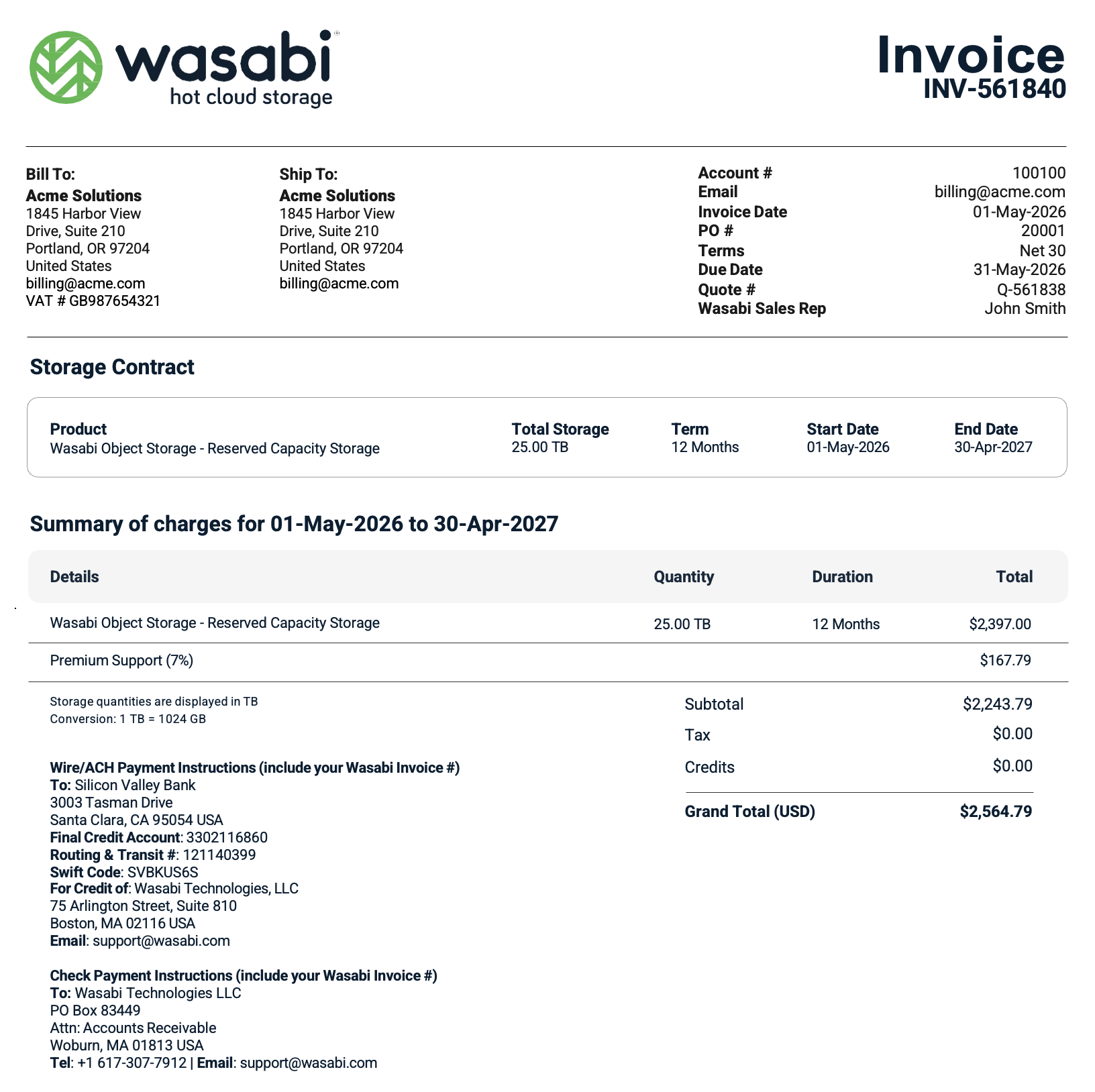
A standard RCS invoice is generated when you purchase an RCS contract. The invoice summarizes the purchased storage capacity, contract term, billing period, and any applicable support charges.
The following is an example of a standard RCS pricing model invoice, which is provided for illustrative purposes only and does not represent actual pricing or customer billing. In this example, the customer purchases 25.00 TB of Reserved Capacity Storage for a 12-month term. The storage contract begins on May 1, 2026, and ends on April 30, 2027. The invoice reflects the RCS purchase amount of $2,397.00.
Because Wasabi Premium Support is required for all Reserved Capacity Storage purchases, the invoice also includes a Premium Support (7%) charge of $167.79.
The invoice subtotal is $2,564.79, with no taxes or credits applied, resulting in a Total of $2,564.79.
RCS Overage Invoice
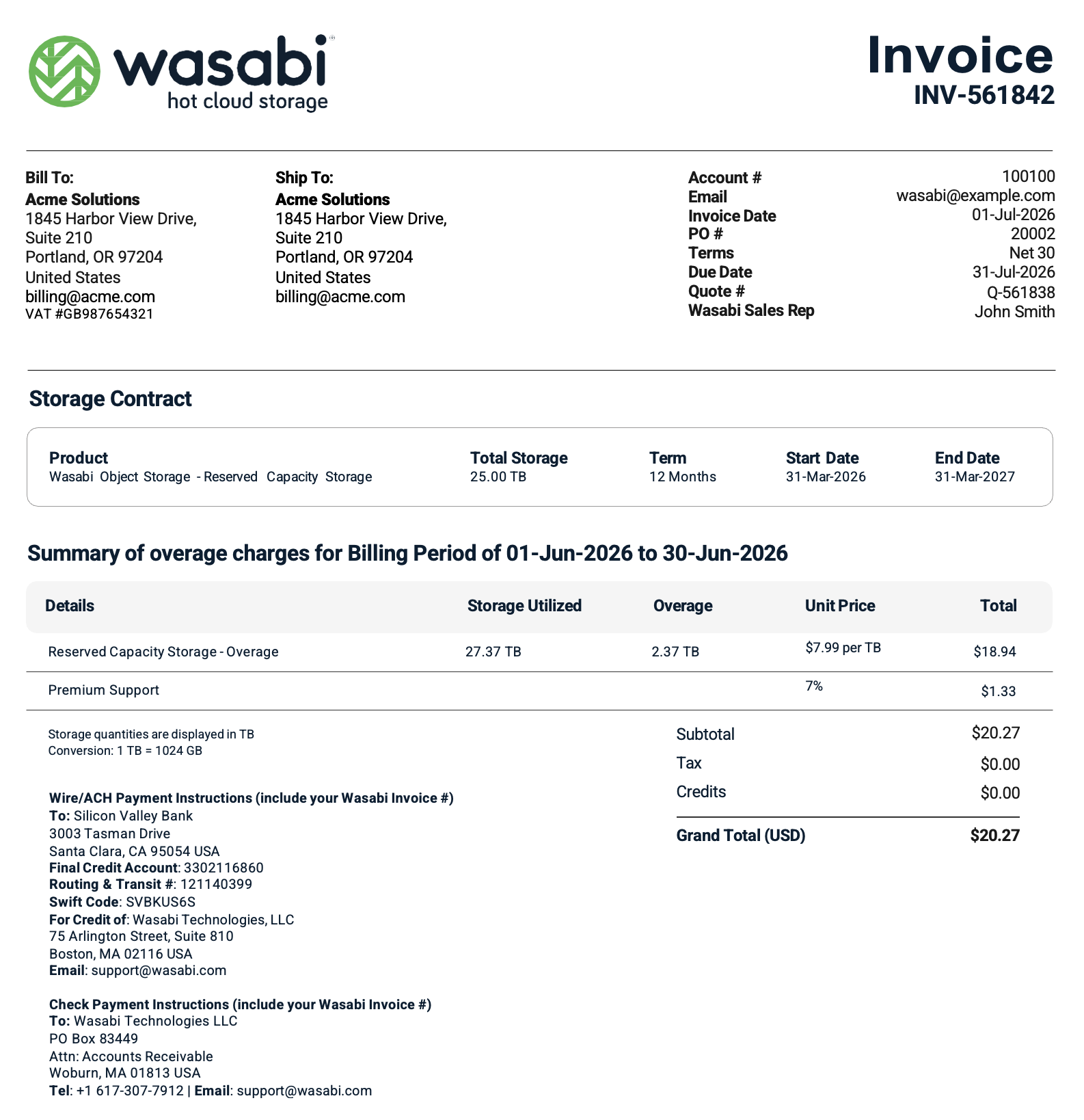
An RCS overage invoice is generated when your combined Timed Active Storage and Timed Deleted Storage exceeds the amount of Reserved Capacity Storage included in your contract (including any add-on capacity purchases).
The following is an example of an RCS overage invoice, which is provided for illustrative purposes only and does not represent actual pricing or customer billing. In this example, the customer has an RCS contract for 25.00 TB of storage. During the billing period, the customer’s total storage utilization reached 27.37 TB, resulting in an overage of 2.37 TB. The invoice calculates the overage using the applicable RCS overage rate of $7.99 per TB, resulting in an overage charge of $18.94.
Because the customer is enrolled in Wasabi Premium Support, a support charge equal to 7% of the overage storage charge is applied, resulting in a $1.33 Premium Support fee.
The invoice subtotal is $20.27, with no taxes or credits applied, for a Total of $20.27.