Wasabi Admin and WACM Admin accounts provide dashboard views to monitor account and storage information. Although the information and tools available on each dashboard are similar, the scope of the data depends on the account and the dashboard you are viewing.
In My Control Account, Control Account, and Account Governance users can access the Usage page, which provides a consolidated view of storage utilization across all linked sub-accounts under the Control Account.
Select the link in the My Control Account section to view storage data, account details, and metrics.

Usage
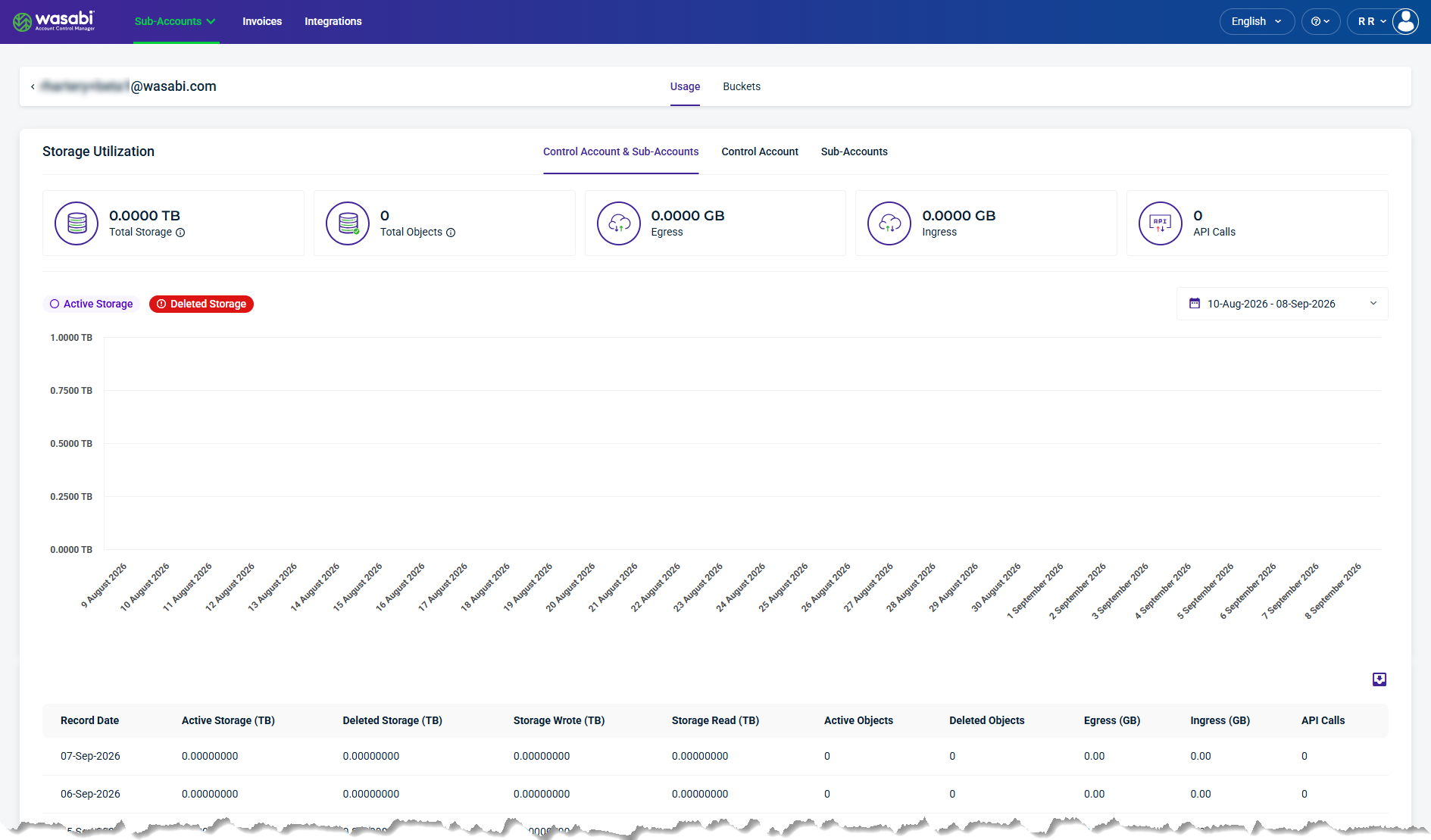
The Usage page provides storage utilization data for My Control Account. Use the links to view utilization for the combined Control Account and Sub-Accounts, or for the Control Account and Sub-Accounts individually.
Summary data cards display Total Storage, Total Objects, Egress, Ingress, and API Calls. The utilization graph shows Active Storage and Deleted Storage over time. Use the date range selector to view historical data.
Summary Data Cards
The top section of the page summarizes data storage utilization for the Control Account and its Sub-Accounts during the selected period.

Total Storage—The total amount of storage used by active and deleted storage.
Total Objects—The total number of objects stored, including both active and deleted objects.
Egress—The total volume of data transferred out of storage.
Ingress—The total volume of data transferred into storage.
API Calls—The total number of API calls made.
Storage Usage Details and Metrics
This section lists the storage usage details and metrics for the Control Account as of the selected record date.
Record Date—The date the utilization data was recorded.
Active Storage (TB)—The amount of active storage used on the record date.
Deleted Storage (TB)—The amount of deleted storage recorded on the record date.
Storage Wrote (TB)—The amount of data written to storage on the record date.
Storage Read (TB)—The amount of data read from storage on the record date.
Active Objects—The number of active objects stored on the record date.
Deleted Objects—The number of deleted objects recorded on the record date.
Egress (GB)—The volume of data transferred out of storage on the record date.
Ingress (GB)—The volume of data transferred into storage on the record date.
API Calls—The number of API calls made on the record date.
Select a Date
The calendar dropdown lets you select a date to view historical data.
Export Data
The export tool lets you filter results and export data to CSV, JSON, or Excel.
