The Wasabi Compute (powered by IBM) integration with WACM enables all WACM Control Account users who are also Wasabi Compute users to view compute utilization reports and utilization alerts.
Supported Use Case
The supported use case for Wasabi Compute with WACM integration includes:
Utilization View—A Control Account user can view detailed compute utilization over a specified period. This view includes the cost of all cloud components deployed to that account.
Utilization Tracking—A WACM compute user can view the cloud credits used compared with the cloud credits purchased.
Utilization Notification—Timely alerts about compute utilization (compute credits consumed as a percentage of compute credits purchased) are generated when thresholds are reached.
Account Access Disablement—Compute accounts with utilization that reaches the purchased compute credits will be disabled.
Compute Utilization View
A Compute user in WACM has access to the Compute Utilization page. This page provides detailed compute utilization data that lets users quickly see how compute account resources are used over time and where utilization is concentrated.
Utilization is measured as the credits (USD) used relative to the credits purchased and is updated every two hours. The total utilization of resources for an account is the sum of the individual resources used over a specified period.
Contract start and end dates define when controls, such as alerts, thresholds, and account access enablement or disablement, should apply. Purchased credits expire on the contract end date. The contract must be renewed before the end date to avoid Wasabi Compute access disablement. Contact your Wasabi sales representative for contract renewal.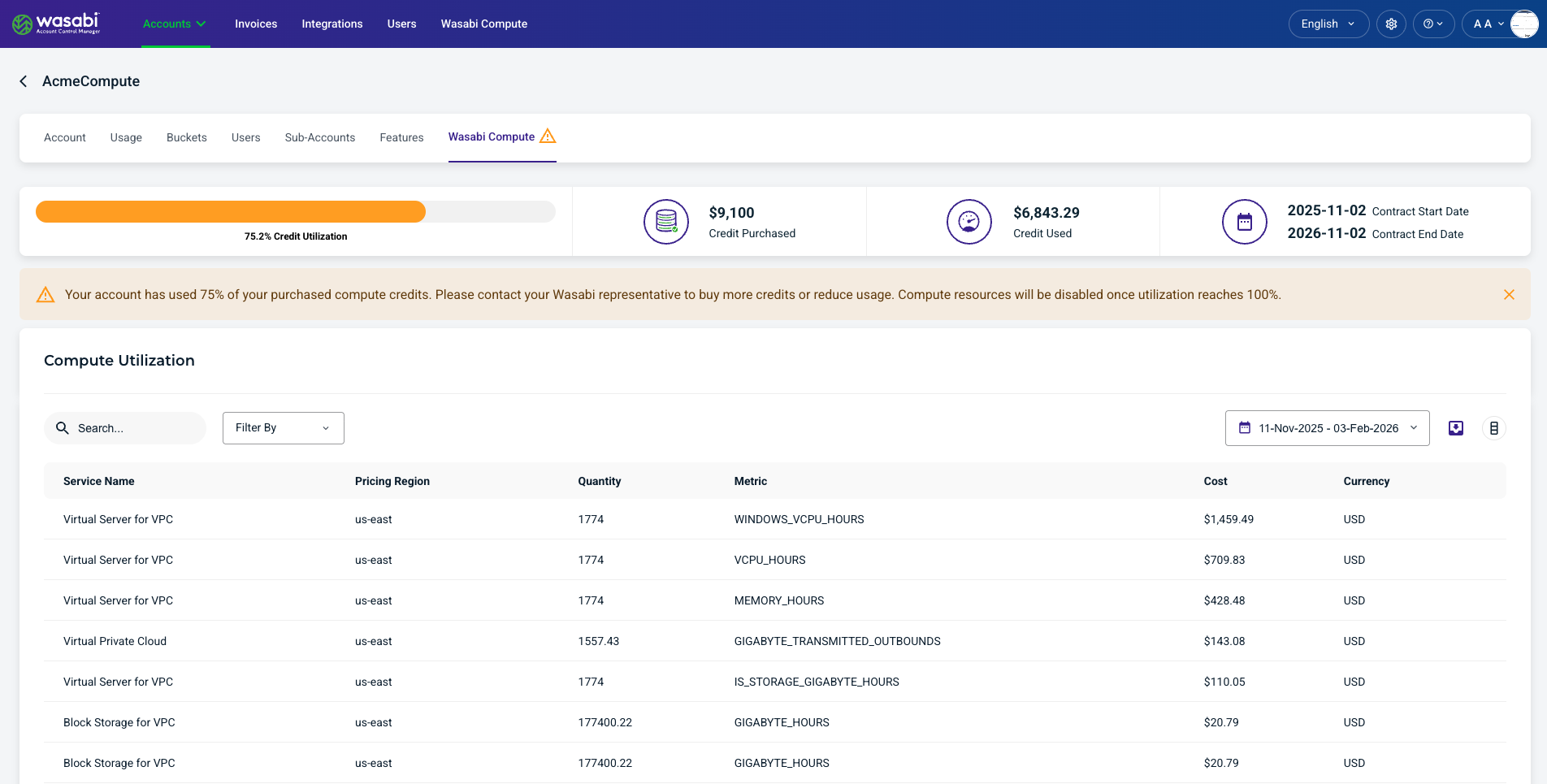
The Compute Utilization page provides the following elements:
A detailed compute utilization table that lets users quickly see how compute account resources are used over time and where utilization is concentrated. Displayed columns can be added or removed using the menu icon.
Alert banners notify users when purchased compute usage credits are consumed and when usage reaches the configured thresholds of 75, 90, and 100%.
Filter By drop-down lets you filter by:
Service Name
Instance Name
Control Account
Tag Name
Date range filter allows:
Quick queries (last 24 hours, last 30 days, month to date, last month)
Custom Range queries
Export button formats data as CSV, JSON, or Excel.
Wasabi Compute Details and Metrics
Wasabi Compute includes the following details and metrics for each resource consumed:
Service Name—Wasabi Compute service or resource category being billed.
Control Account—Account responsible for managing and owning the resource.
Instance Name—Unique identifier or name assigned to the compute instance.
Creation Date—Date the resource or instance was originally created.
Tag Name—User-defined label used to organize and categorize resources.
Pricing Region—Geographic region where the resource is deployed and priced.
Quantity—Amount of usage measured for the billing period.
Metric—Type of usage being tracked (hours, storage, requests).
Unit—Unit of measurement for the usage metric.
Cost—Total charge calculated for the recorded usage.
Currency—Currency in which the cost is billed.
Search and Filter Wasabi Compute
Use the Search, Filter By, and calendar tools to view data for a selected date. Use the export tool to download data for reporting or further analysis.
The following Filter By menu options are available:
Service Name—Filters data by the selected service name.
Instance Name—Filters data by the selected instance name.
Control Account—Filters data by the associated Control Account.
Tags—Filters data based on tags assigned to the service or instance.