What is MFA in WACM?
MFA strengthens WACM account security by enforcing multi-factor authentication for local users and allowing SSO users to enable MFA. This helps reduce the risk of unauthorized account access.
What happens to my existing WACM account?
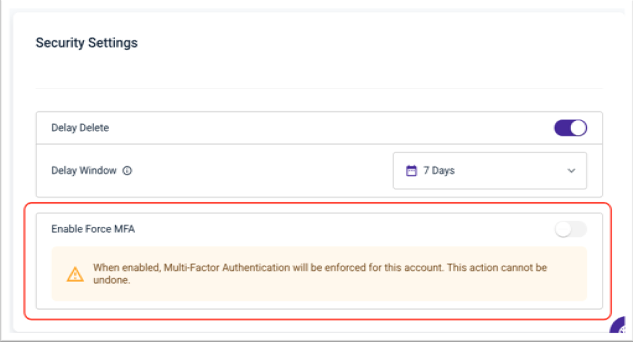
MFA is not automatically enabled for existing WACM accounts. Account administrators should enable Force MFA for their account. Select My Profile, then the Account tab, then scroll down to Security Settings. For more information, see Account Profile in Control Accounts - WACM Admin.
Who is required to use MFA by default?
All new WACM users who sign in directly without single sign-on (SSO) must configure MFA.
What about users who sign in with SSO?
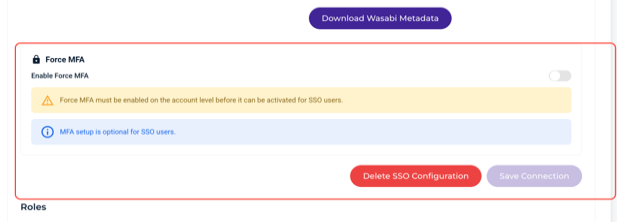
MFA is optional for SSO users and disabled by default. Administrators can enable MFA through a new toggle in the WACM SSO configuration settings, allowing SSO users to configure MFA for their accounts.
Can I disable Force MFA after enabling it?
No. Once Force MFA is enabled at the account level, it cannot be disabled. Administrators should confirm they are ready to enforce MFA before enabling this setting. This setting will be mandated for all accounts starting January 1st, 2027.
What will users experience?
When Force MFA is enabled, users are prompted to configure MFA the next time they sign in to WACM. Users must complete MFA setup before they can access their accounts.
Can I exempt specific users from MFA?
Yes. Administrators can disable MFA for individual users using the MFA toggle in each user's profile.
Can I identify users who sign in using SSO?
Yes. The user profile page includes an SSO status indicator that identifies whether a user authenticates through single sign-on (SSO).
Who can manage MFA settings for users?
Administrators can manage user-level MFA settings based on their assigned role and position in the WACM account hierarchy.
Administrator Role | Users Whose MFA Settings Can Be Managed |
Account Governance (AG) Admin | All Account Governance (AG), Control Account (CA), and Channel Account (CHA) users |
Control Account (CA) Admin | All Control Account (CA) and Channel Account (CHA) users |
Channel Account (CHA) Admin | Channel Account (CHA) users only |