The Wasabi Versioning feature allows you to preserve, retrieve, and restore every version of every object stored in a Wasabi bucket. Once you enable versioning for a bucket, Wasabi preserves existing objects any time you perform a PUT, POST, COPY, or DELETE operation on them. By default, GET requests will retrieve the most recently written version. Older versions of an overwritten or deleted object can be retrieved by specifying a version in the request.
Along with versioning, you may enable compliance with an option to delete after retention. The Compliance feature is well paired with versioning because it allows you to update files (versioning), but not delete or edit the original versions (compliance), and then automatically delete all versions after the specified period of time (delete after retention). Note that all versions include the current version as well.
A bucket can accumulate a large number of delete markers, which are part of LIST operation calls to any S3 storage system. If a bucket has a large number of delete markers, LIST queries can take a long time to go through all keys in the bucket. This may result in slower response times.
You can delete old object versions individually. Or, you can mass delete a set of objects and/or delete markers.
Deleting Individual Objects
You can delete an object version using either the AWS CLI or S3 Browser. (The following examples use Wasabi's us-east-2 storage region. Use any other appropriate Wasabi storage regions.)
AWS CLI
From the AWS CLI, you can delete a specific version of a file by specifying the --version-id in the delete message.
Get the version ID using the AWS CLI command to list the objects with their version IDs.
aws s3api list-object-versions --bucket --endpoint-url https://s3.us-east-2.wasabisys.com This will list the objects with their versions.
{
        "DeleteMarkers": [
            {
                "Owner": {
                    "DisplayName": "wasabisupport",
                    "ID": "64FC53EBEA41CD99146391187E793B721167132B88F80CB6D63D39A3C91182CD"
            },
                "IsLatest": true,
                "VersionId": "001558365475266751389-VwaBekKLGa",
                "Key": "Folder_with_ten_5MB_files/",
                "LastModified": "2019-05-20T15:17:55.000Z"
            },
            {
                "Owner": {
                    "DisplayName": "wasabisupport",
                    "ID": "64FC53EBEA41CD99146391187E793B721167132B88F80CB6D63D39A3C91182CD"
            },
                "IsLatest": true,
                "VersionId": "001552912074127114450-S1bSJDBWTH",
               "Key": "Folder_with_ten_5MB_files/5MB-copy-8.zip",
               "LastModified": "2019-03-18T12:27:54.000Z"
            },
        ...
Select the version ID from the VersionId field in the JSON-formatted output. You can use the LastModifiedDate as a reference to select the most recent or the most outdated version of the file.
When you have the version-id, you can delete it using the following command.
aws s3api delete-object --bucket --key --version-id --endpoint-url https://s3.us-east-2.wasabisys.comFor example:
$ aws s3api delete-object  --bucket mytestbucketwithversions  --key "Folder_with_ten_5MB_files/5MB-copy-8.zip" --version-id 001552912074127114450-S1bSJDBWTH --endpoint-url=https://s3.us-east-2.wasabisys.com
        {
            "VersionId": "001552912074127114450-S1bSJDBWTH",
            "DeleteMarker": true
        }
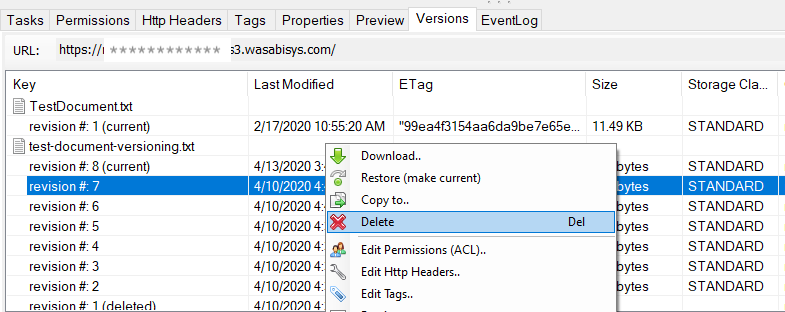
S3 Browser
You can use S3 Browser to see and remove versioned objects. While this is manual, it lets you go in and delete any object versions to reduce your total storage volume.
Mass Deleting Object Versions and/or Delete Markers
You can use a scripted method to delete large object sets using Python code, as outlined in this article.
Make sure you have installed AWS SDK boto3 for Python on your CLI.
If you want to clear/delete the bucket or permanently delete the file, turn off the Versioning feature on your bucket before running the script.
Install Python 3+ version to run this script.
To delete current and/or non-current versions (and delete markers):
Download and run the script: Wasabi_bucket_managing_tool.py
When you execute the script, it will prompt you to select the profile or enter the API keys of the administrator who is executing this script.
If you already have a profile configured on your CLI, enter 1. (You can configure the AWS CLI profile for the Wasabi account using the Wasabi keys before running the script.)
Optionally, you can use credential files to run your code, but it is always a best practice to use such an implementation wherein your credential keys are in a file stored on your local machine (rather than being part of your actual code or entering keys at the runtime prompt).
If you do not want to use the existing profile, enter 2 and then enter your API keys.
You will be prompted to select an option from the menu. Select an option (enter 1, 2, 3, 4, or 5) based on what you want to delete.
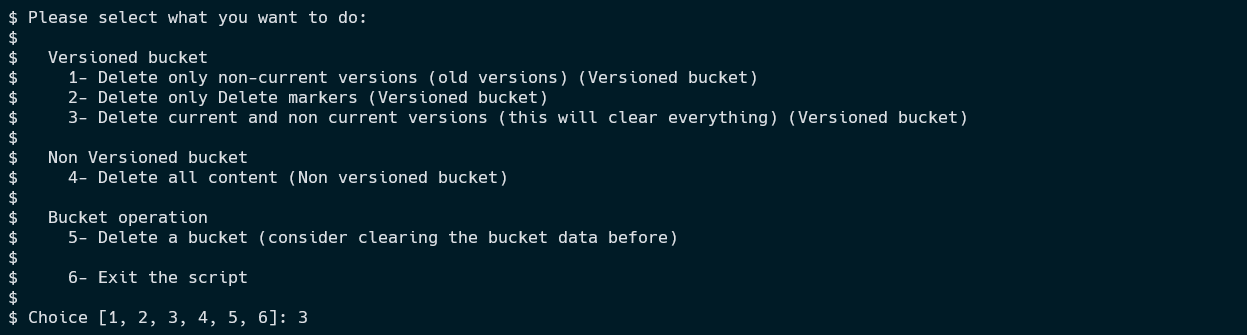
Enter your bucket name (0-versioning-1, in the example below). The bucket region will be detected automatically (us-east-1, in the example).
If you specify a prefix, be sure to enter the full prefix path (excluding the bucket name).

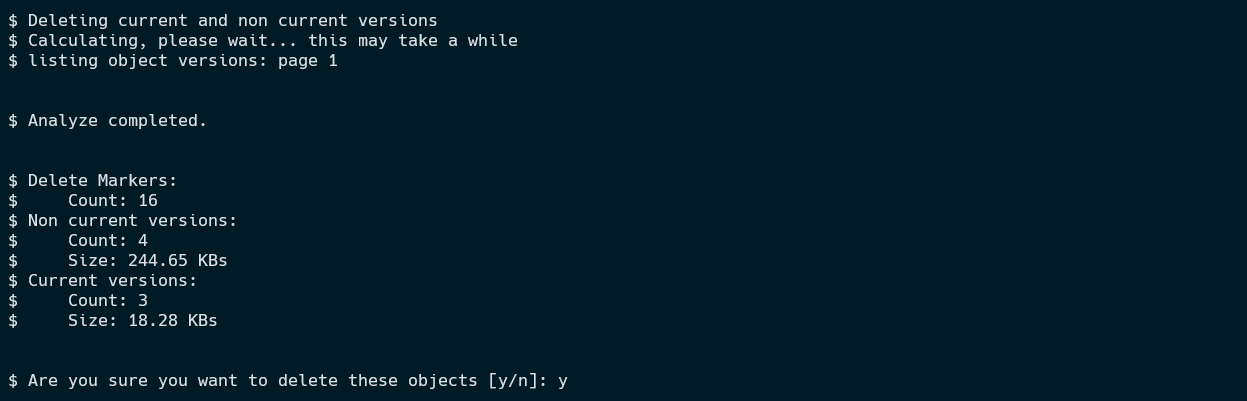
The script will perform complete pagination of your bucket and display:
Total number of delete markers that will be deleted (if present)
Total number of non-current objects that will be deleted (if present)
Total number of current objects that will be deleted from your bucket (if present)
The script then asks if you are sure you want to delete the objects. Enter y to delete.
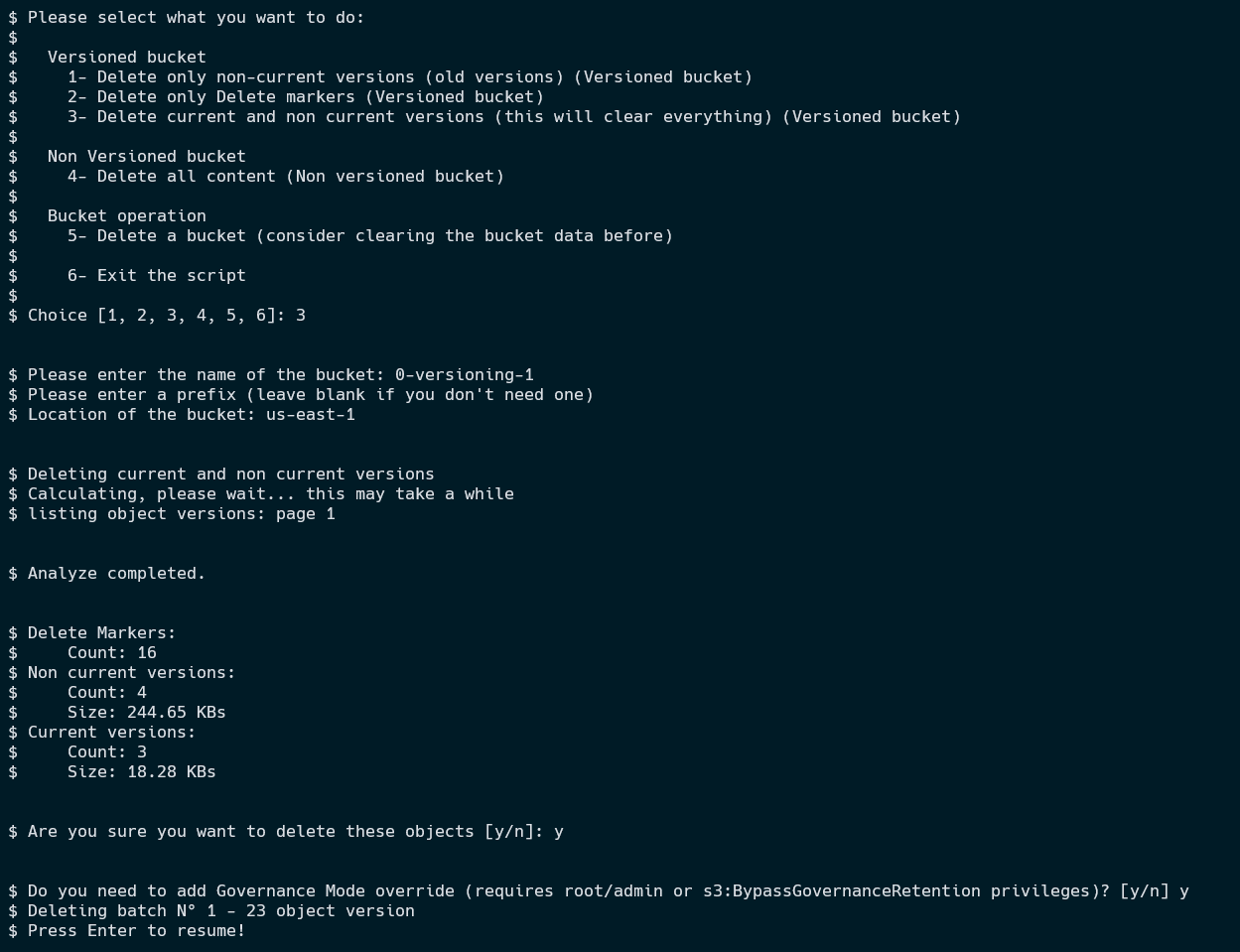
The script asks if you need to enable the Governance Mode override. This option is for Object Lock immutable buckets with Governance mode enabled (not Compliance mode). When a bucket is locked with Governance mode, you may remove objects only if your IAM entity has the s3:BypassGovernanceRetention permission and you include the
BypassGovernanceRetentionheader in the request. If you require this header and your IAM entity has the proper permissions, enter y to enable this option. Otherwise, enter n to bypass.Each log entry will represent the deletion of 1000 objects at a time.

After you enter your response to the Governance question, the script deletes the requested objects. In the example below, 23 objects are deleted.

You can press the Enter key to continue.
After executing the script and completing the deletion process, you may run the same script again to confirm your total number statistics for:
Delete markers
Non-current objects
Current objects
This is an example of the entire output displayed by the script:
Alternative for Deleting Delete Markers
s3undelete is a simple utility created by ARQ that removes delete markers from S3 (and S3-compatible) objects in buckets that have versioning enabled.
Download the s3undelete utility for your operating system:
Set two environment variables,
AWS_ACCESS_KEYandAWS_SECRET_KEY, to your S3 access key ID and secret access key, respectively.To list delete markers, use:
s3undelete list us-east-2 https://s3.us-east-2.wasabisys.com/username-delete-marker-demo-bucket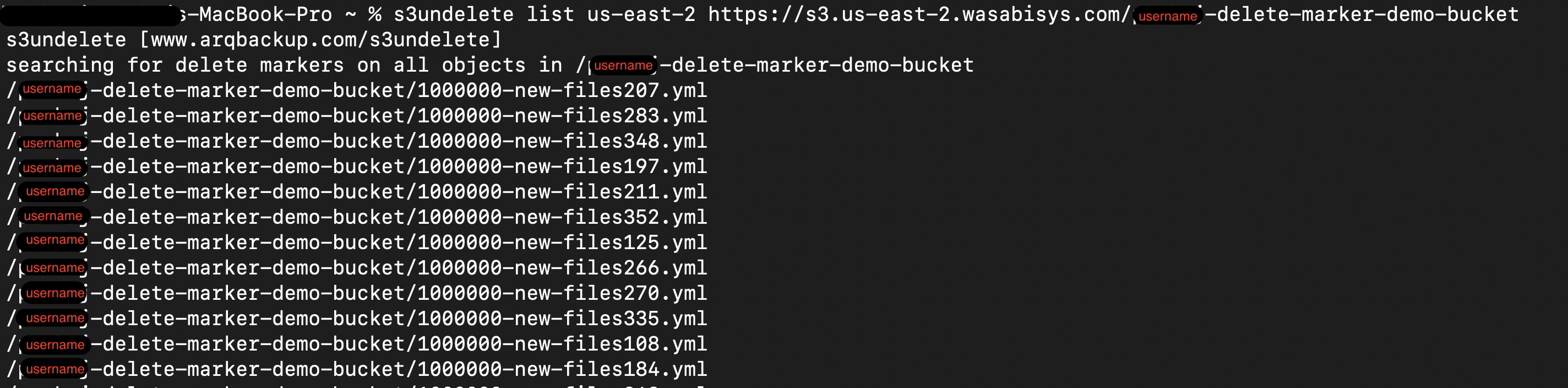
To remove delete markers, use:
s3undelete undelete us-east-2 https://s3.us-east-2.wasabisys.com/username-delete-marker-demo-bucket