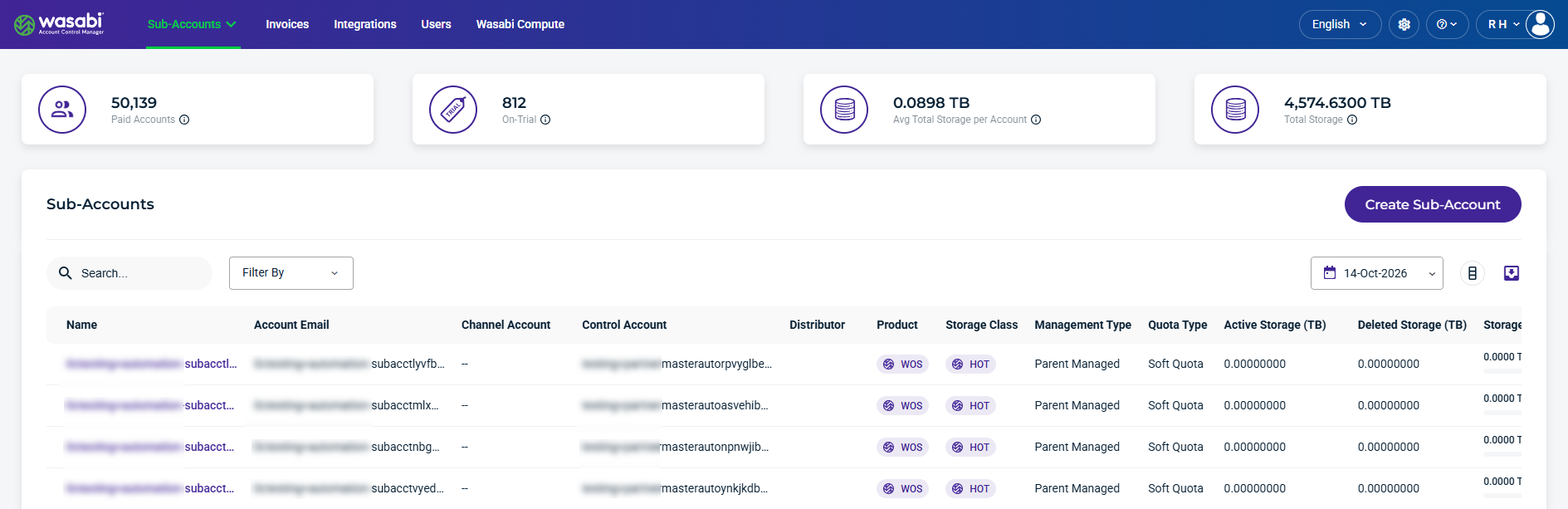
When you sign in to WACM as a Wasabi Admin, select Accounts from the navigation bar, then select Sub-Accounts from the dropdown menu. For each Sub-Account, the table displays account information, storage details, and usage metrics. You can also search and filter account details, select a date to view historical data, export data, and create a Sub-Account.
Sub-Account Summary Card Data
The top section of the dashboard summarizes account and storage information.

Paid Sub-Accounts—The number of paying Sub-Accounts, including suspended paid accounts.
On-Trial—The number of Sub-Accounts in a trial period, including suspended trial accounts.
Average Total Storage per Account—The average amount of storage used per Sub-Account.
Total Storage—The total amount of storage used for active and deleted Sub-Accounts.
Sub-Account Details and Metrics
This section lists the details and metrics for each Sub-Account:
Name—The Sub-Account’s name. This is based on the name entered when the Sub-Account was created.
Account Email—Email used for the Sub-Account.
Channel Account—Associated with the Sub-Account.
Control Account—Associated with the Sub-Account.
Distributor—Associated with the Sub-Account.
Product—The product storage type for the account, such as Wasabi Cloud NAS (WCN), Wasabi Object Storage (WOS), or Wasabi Surveillance Cloud (WSC).
Storage Class—The storage tier assigned to the account, such as CHILL, FIRE, or HOT.
Management Type—The password management type for the Sub-Account, such as End-User Managed or Parent Managed.
Quota Type—The quota type for the Sub-Account, such as Hard Quota or Soft Quota. When enabled, Hard Quota prevents storage usage from exceeding the configured storage quota.
Active Storage (TB)—The amount of currently active storage for the account.
Deleted Storage—The amount of deleted storage for the account.
Storage Utilization—Percentage of storage amount used, based on the configured storage quota value. (Sub-Account Active + Deleted Storage) / Storage Quota.
Creation Date—The date that the Sub-Account was created.
Quota Start Date—The selected start date to begin tracking the object storage used.
Quota End Date—The selected end date to stop tracking object storage used.
Quota Days Remaining—The number of days remaining for the time period selected to track the object storage used.
Quota Date Status—Indicates whether the object tracking period is Active, Expired, Not Set, or Scheduled.
Deletion Date—The date the Sub-Account was deleted.
Trial Expiration—The date the trial account is set to expire.
MFA—Indicates whether MFA is enabled for the account.
Status—Indicates the sub-account status as Deleted, Denied, On Trial, Paid Account, Password Pending, or Suspended. If the account is On Trial, you will see a colored countdown. If the account is paid, this column entry will be green. If the account is deleted, this column entry will be pink.
Record Date—The date the Sub-Account usage was recorded.
Find and Filter Sub-Accounts
Use the Search, Filter By, and calendar tools to find Sub-Accounts, filter details, and view data for a selected date. Use the Export tool to download data for reporting or further analysis.

Search and Filter Sub-Accounts
Use the Search field to find specific Sub-Accounts and use the Filter By menu to narrow the list based on account status, enabled features, and other criteria.
The following Filter By menu options are available:
Control Account—Filters Sub-Accounts by specific Control Accounts.
Distributor—Filters Sub-Accounts by specific Distributors.
Product—Filters by the storage product assigned to a Sub-Account, such as WCN, WOS, or WSC.
Storage Class—Filters by the storage class, such as CHILL, FIRE, or HOT.
Quota Type—Filters by the quota type, such as Hard Quota or Soft Quota. When enabled, Hard Quota prevents storage usage from exceeding the configured storage quota.
MFA—Filters accounts based on whether Multi-Factor Authentication (MFA) is enabled or disabled. Select Enabled to list accounts with MFA enabled or select Disabled to list accounts with MFA disabled.
Status—Filters by the current status of a Sub-Account, such as Deleted, Denied, On Trial, Paid Account, or Password Pending.
Management Type—Filters Sub-Accounts based on how their passwords are managed. Select one of the following options:
End-User Managed— Displays Sub-Accounts whose users set their own passwords.
Parent Managed— Displays Sub-Accounts whose passwords are set by the parent account administrator.
Channel Account—Filters Sub-Accounts by specific Channel Accounts.
Quota Date Status—Filters on the quota date status of Active, Expired, Not set, or Scheduled.
Has quota start date—Filters based on whether the quota start date is set to True or False.
Has quota end date—Filters based on whether the quota end date is set to True or False.
Show Deleted Accounts—Filters deleted Sub-Accounts. By default, deleted accounts are hidden.
Select a Date
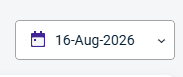
The calendar dropdown lets you select a specific Record Date to filter account data.
Export Sub-Accounts
The Export tool lets you filter results and export data to CSV, JSON, or Excel formats.
