Redis has an open-source version of its in-memory data store used for caching, real-time applications, and with the Redis query engine included in Redis Open Source 8, vector similarity search for AI applications. Redis keeps its working data in memory and serves the data you need quickly while Wasabi stores your full dataset and your backups. This article covers loading data from a Wasabi bucket into Redis and caching data in Redis while reading from Wasabi when the data is not yet in memory. Backing up Redis snapshots to a Wasabi bucket then restoring from those backups is also covered.
Requirements
This solution was tested with the software listed below. Later compatible versions are expected to work, but have not been specifically tested.
Active Wasabi Cloud Storage account.
Wasabi bucket with Object Lock enabled—For more information, review Working With Buckets and Objects and Enabling Object Lock.
Ubuntu Server 26.04.1 LTS.
Docker Engine v29.1.3.
Redis Open Source v8.10.3 (the redis:8 Docker image). For more information, review Install Redis Open Source.
redis-tools (redis-cli) v8.0.5.
Python v3.14.4 with the boto3 v1.43.120, redis v8.1.0, numpy v2.5.4, and pyarrow v26.0.0 packages.
This article stores backups and data in the same bucket, separated by the prefixes redis-backups/ and redis-data/. To use separate buckets, set WASABI_LOCK_BUCKET (backups) and WASABI_BUCKET (data) to different bucket names.
Configuring Wasabi
Reference commands in this article use the placeholder YOUR_WASABI_BUCKET_NAME, YOUR_WASABI_ACCESS_KEY, and YOUR_WASABI_SECRET_KEY—replace them with your own values. Commands and output labeled “Example” are copied directly from the terminal during testing using a bucket named mt-redis-ol.
Log in to the Wasabi Console as the account root user.
Create a policy for a “redis” user (that will be created in the next step) using the following policy. Change YOUR_WASABI_BUCKET_NAME to your own Wasabi bucket name. See Creating a Policy for instructions on how to create a policy.
{
  "Version": "2012-10-17",
  "Statement": [
    {
      "Sid": "AccountLevel",
      "Effect": "Allow",
      "Action": "s3:ListAllMyBuckets",
      "Resource": "arn:aws:s3:::*"
    },
    {
      "Sid": "BucketLevel",
      "Effect": "Allow",
      "Action": [
        "s3:ListBucket",
        "s3:ListBucketVersions"
      ],
      "Resource": "arn:aws:s3:::YOUR_WASABI_BUCKET_NAME"
    },
    {
      "Sid": "ObjectLevel",
      "Effect": "Allow",
      "Action": [
        "s3:GetObject",
        "s3:GetObjectVersion",
        "s3:PutObject",
        "s3:DeleteObject",
        "s3:DeleteObjectVersion",
        "s3:AbortMultipartUpload"
      ],
      "Resource": "arn:aws:s3:::YOUR_WASABI_BUCKET_NAME/*"
    }
  ]
}
Create a "redis" user and attach the previously created policy to it. Use the following settings for the user. For more information, see Creating a User.
Allow programmatic-only access, not console access.
Do not require Multi-Factor Authentication (MFA).
It is not necessary to assign the user to a group.
Save the access and secret keys in a secure location.
Configuring Object Lock
Object Lock prevents objects from being deleted or overwritten for a configurable retention period. Set a default retention policy on the bucket so every new object, including each Redis backup, is locked automatically. The scripts in this article do not set any retention themselves.
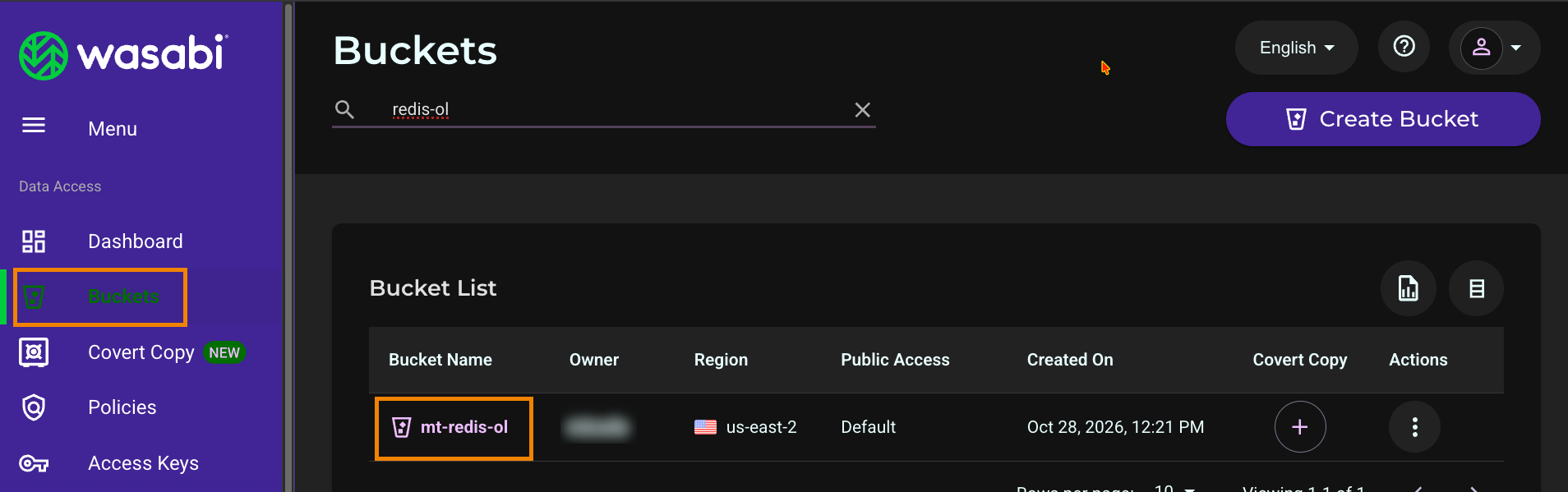
In the Wasabi Console, click Buckets in the left navigation.
Click the name of your Object Lock bucket.
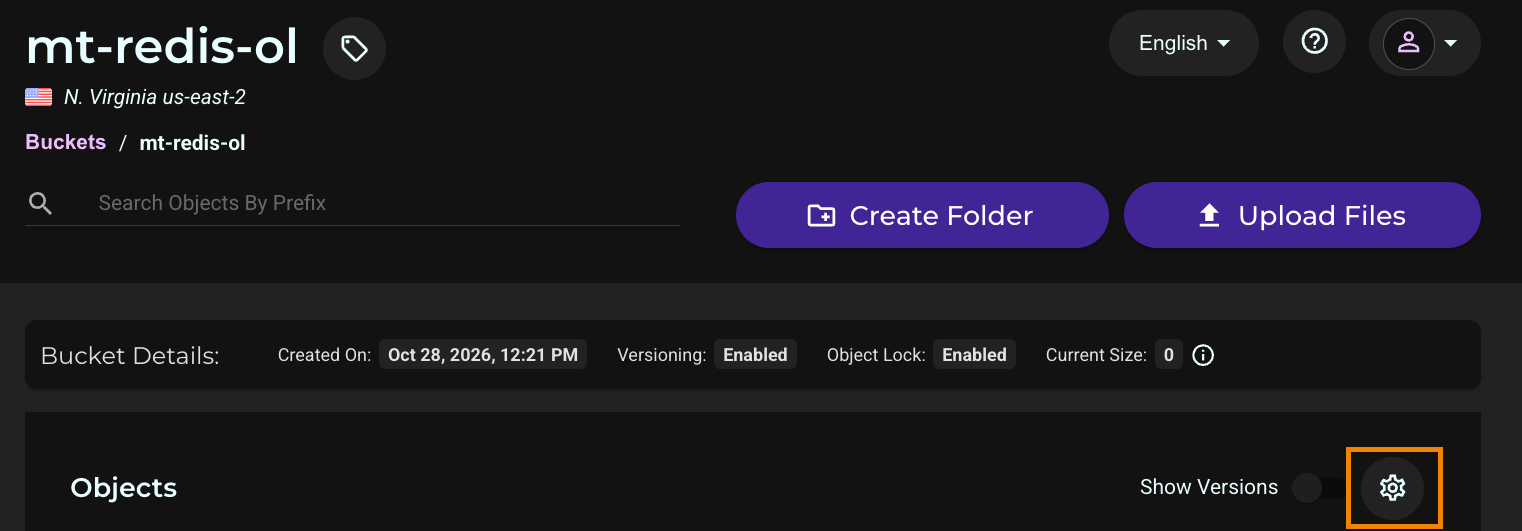
Click the settings (gear) icon.
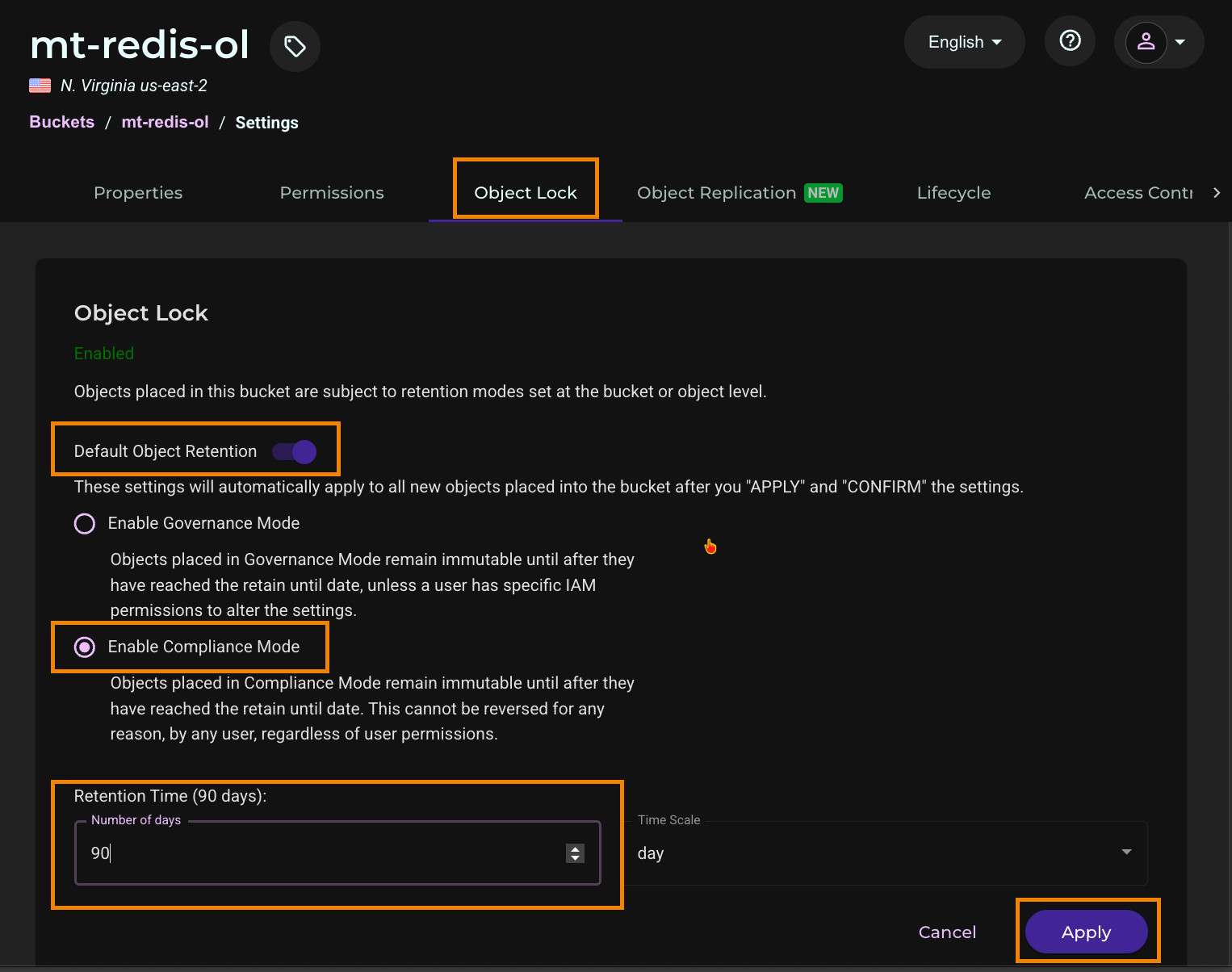
Select the Object Lock tab.
Click the toggle to enable Default Object Retention.
Select Enable Compliance Mode.
Enter the retention time (90 days in this example) and click Apply.
In the Confirm Compliance Mode window, type CONFIRM.
Click Confirm.
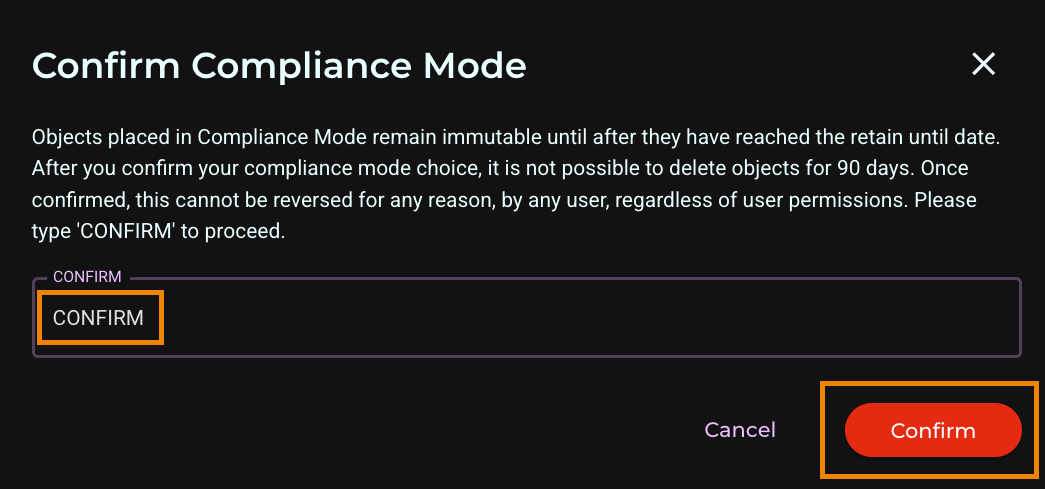
Objects placed in Compliance Mode remain immutable until the retain-until date. This cannot be reversed for any reason, by any user, regardless of user permissions.
The default retention applies to every new object placed in the bucket, not only to backups.
Configuring Lifecycle Policies for Backups
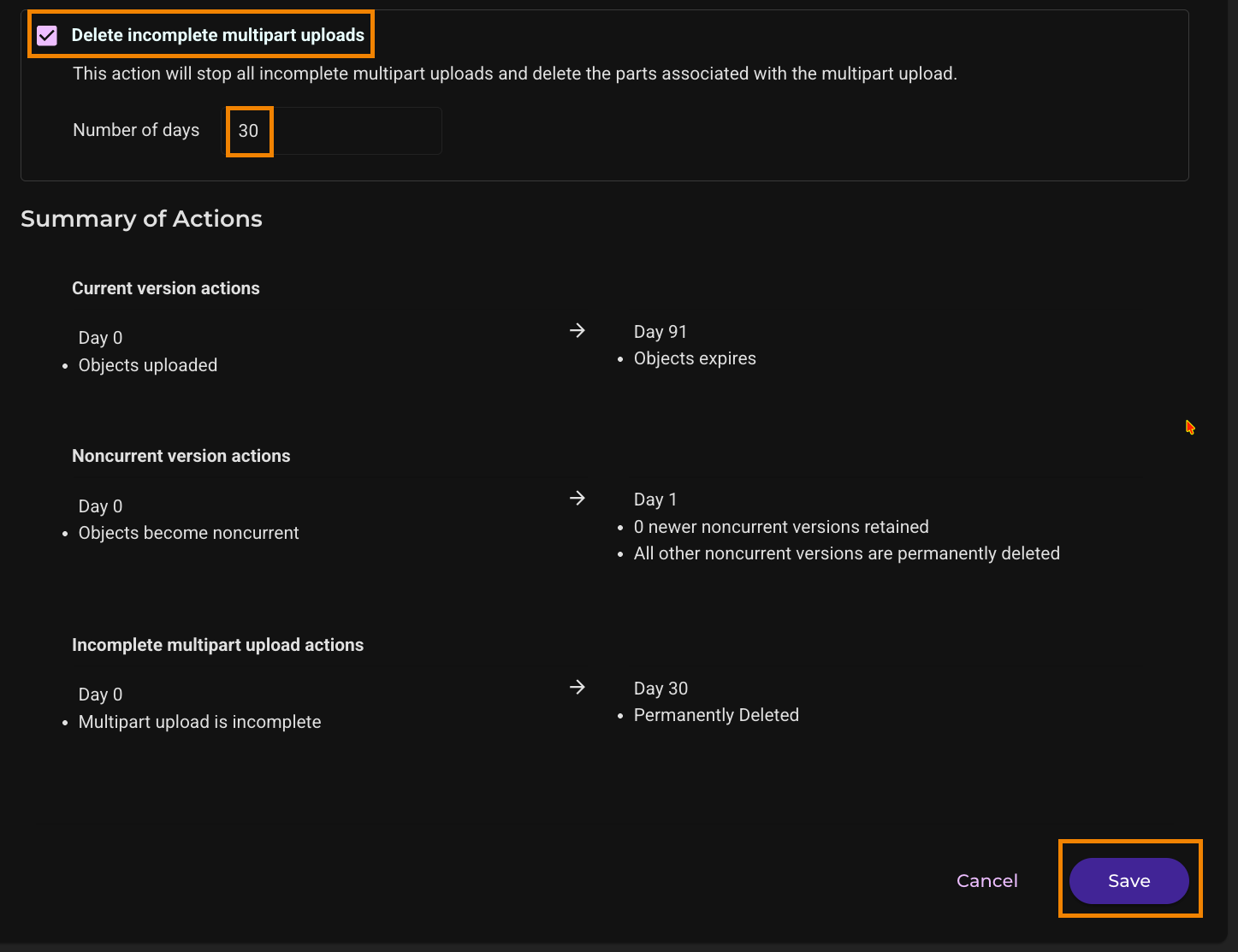
A Lifecycle rule removes backups automatically after their Object Lock retention period ends. In this example, backups are locked for 90 days. The rule expires the current version of each backup 91 days after it is created, which adds a delete marker and keeps the backup as a non-current version, then permanently deletes non-current versions 1 day later. The rule also deletes incomplete multipart uploads after 30 days. For more information, see Lifecycle Settings: Creating a Rule.
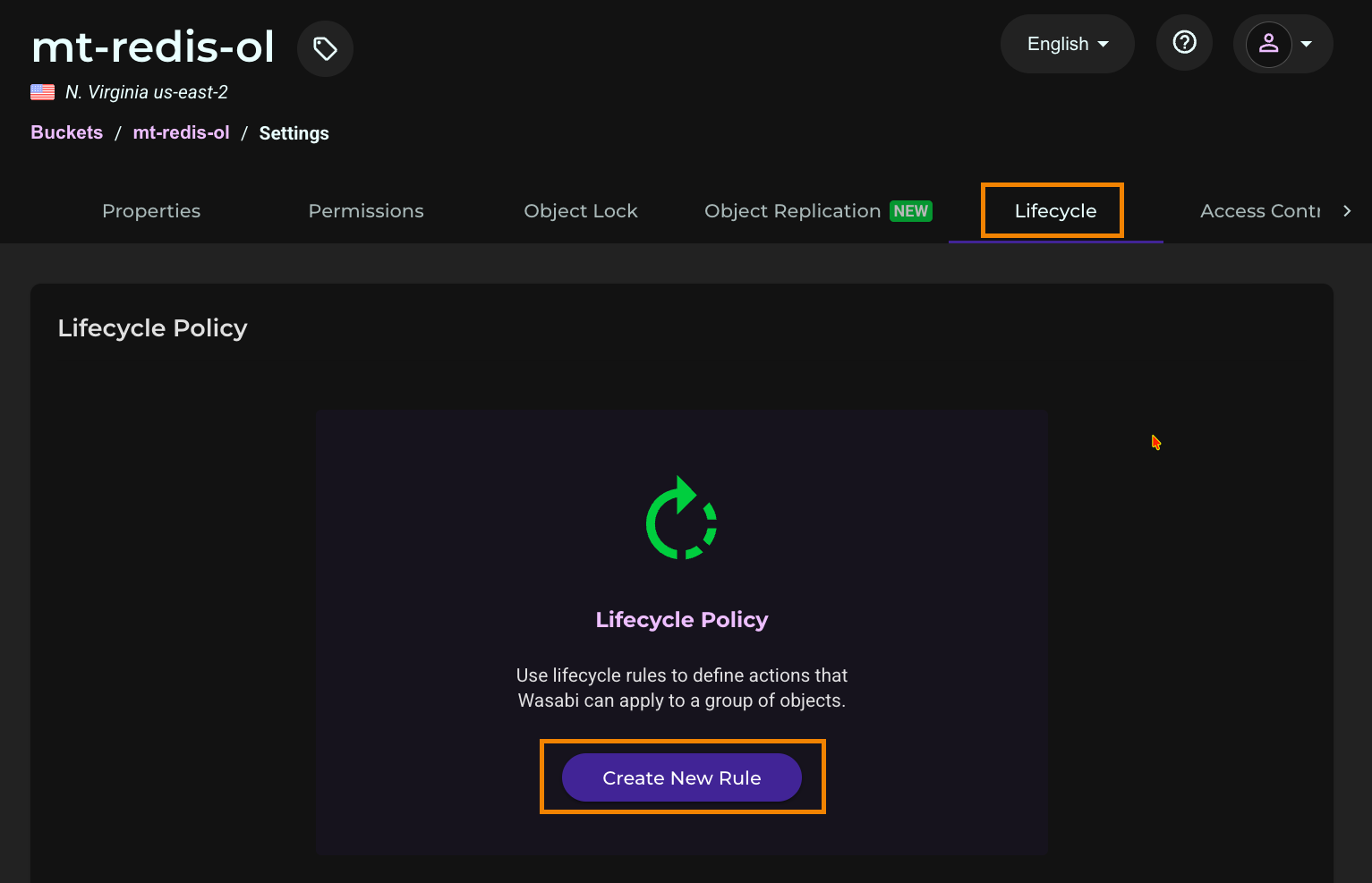
In the bucket settings, select the Lifecycle tab.
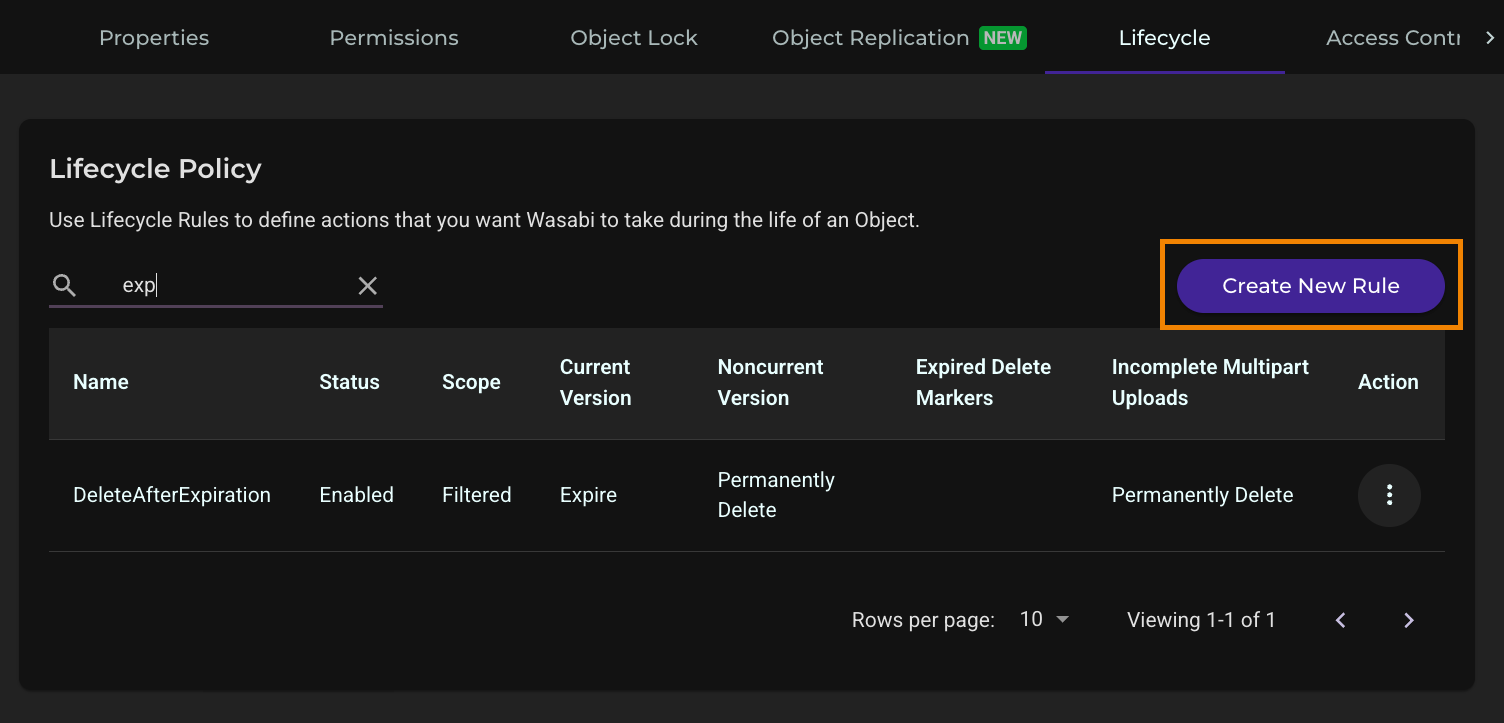
Click Create New Rule.
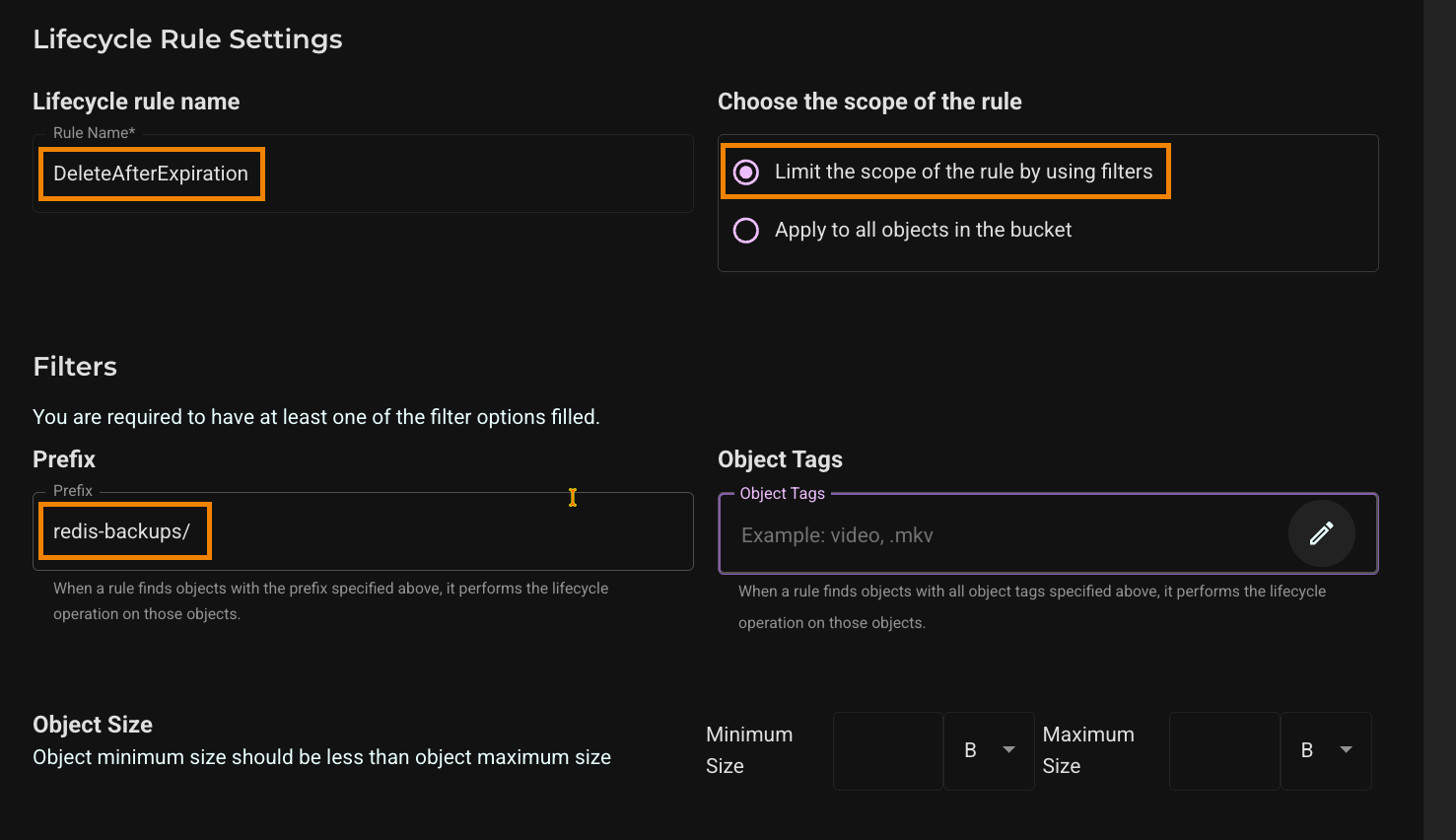
Enter a rule name (for example, DeleteAfterExpiration).
Select Limit the scope of the rule by using filters.
Enter redis-backups/ as the prefix. Scroll down.
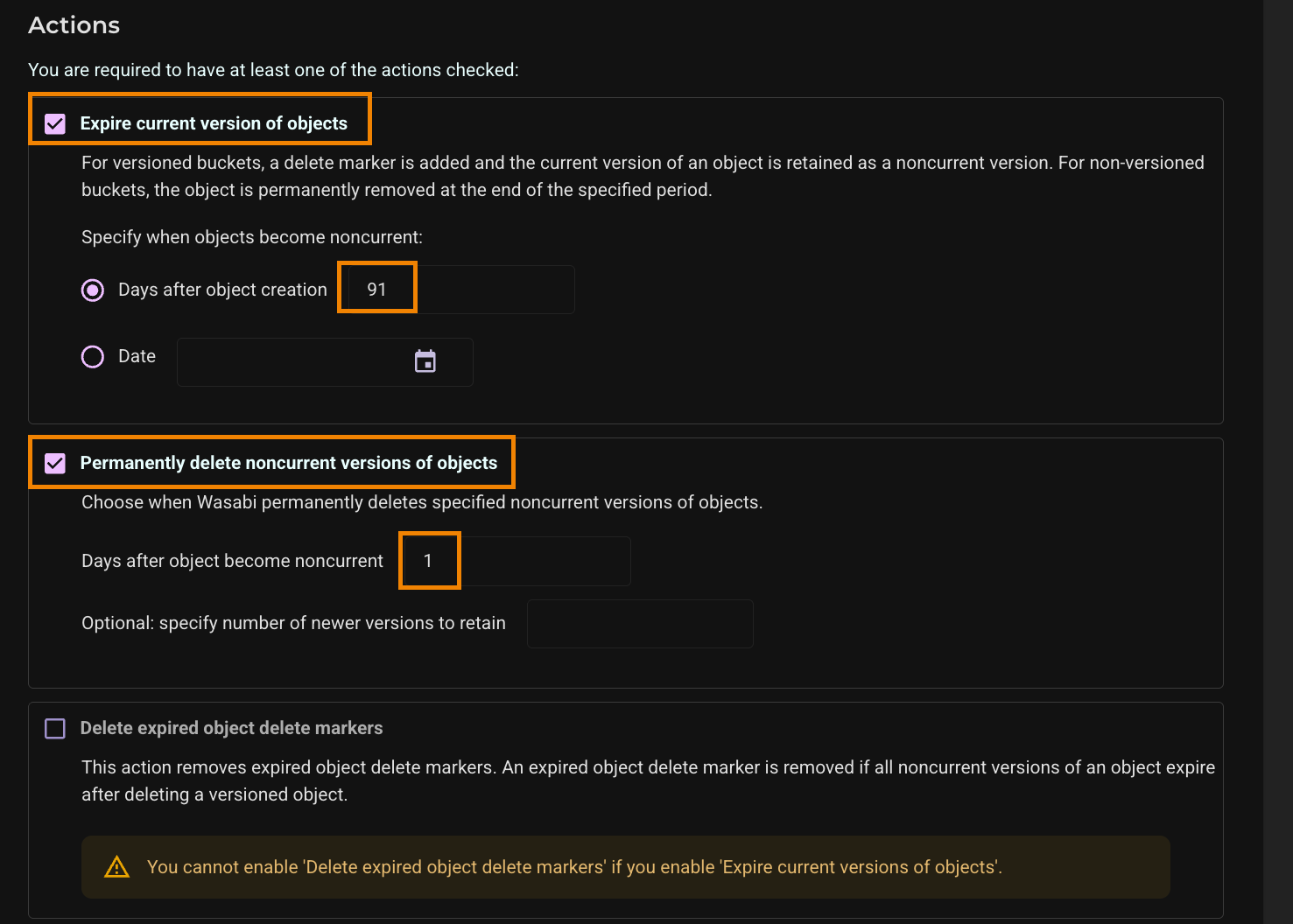
Under Actions, select Expire current version of objects. Enter 91 days after object creation.
Select Permanently delete noncurrent versions of objects. Enter 1 day after objects become noncurrent and scroll down.
Select Delete incomplete multipart uploads and enter 30 days.
Review the Summary of Actions. Click Save.
Configuring Lifecycle Policies for Data (Optional)
If you will also store non-backup data in the Object Lock bucket, add a second rule for the data prefix. This rule permanently deletes older versions of objects that you replace and keeps the current version of your data. It never deletes the current version.
On the Lifecycle tab, click Create New Rule.
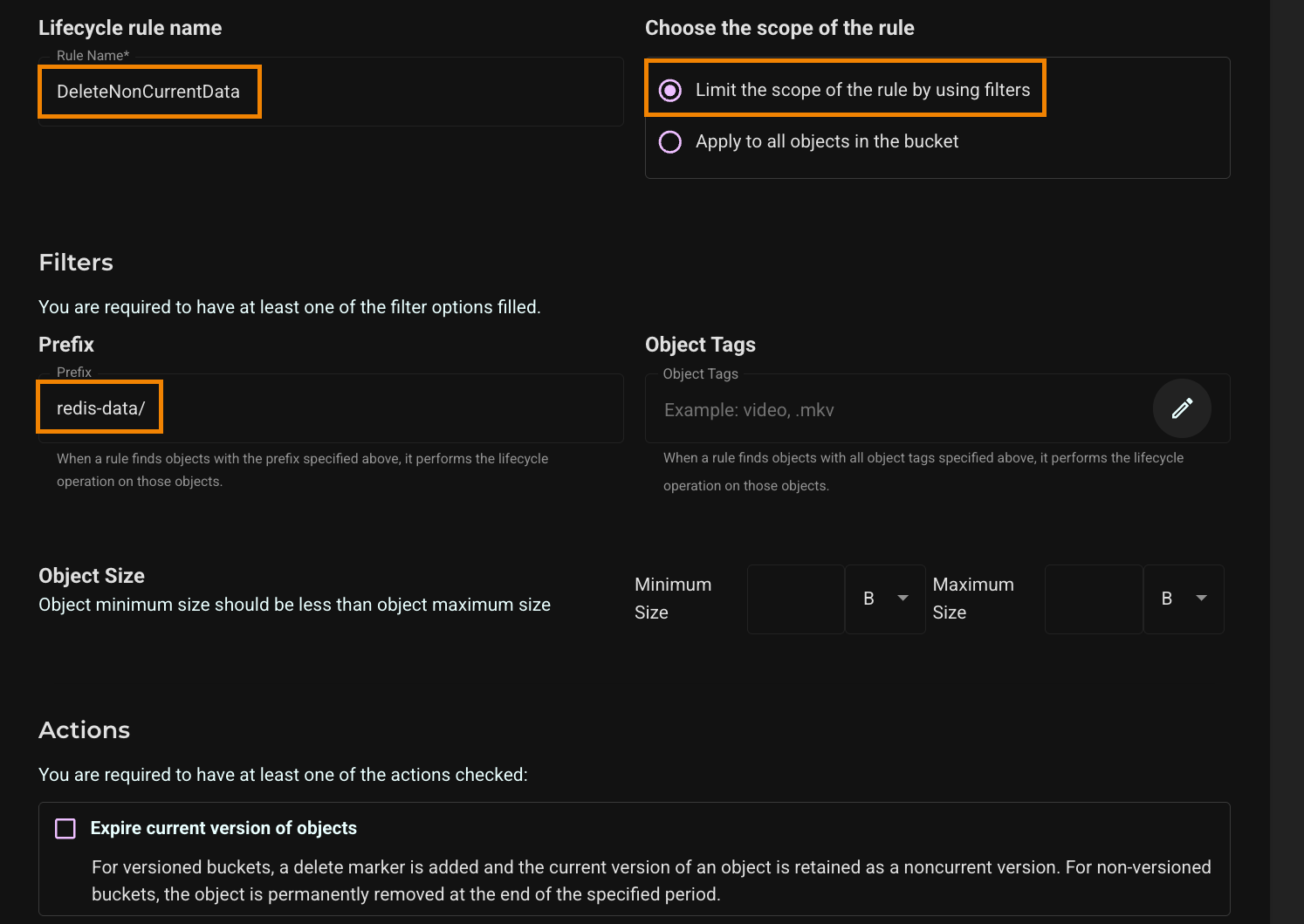
Enter a rule name (for example, DeleteNonCurrentData).
Select Limit the scope of the rule by using filters and enter redis-data/ as the prefix. (Leave Expire current version of objects cleared.) Scroll down.
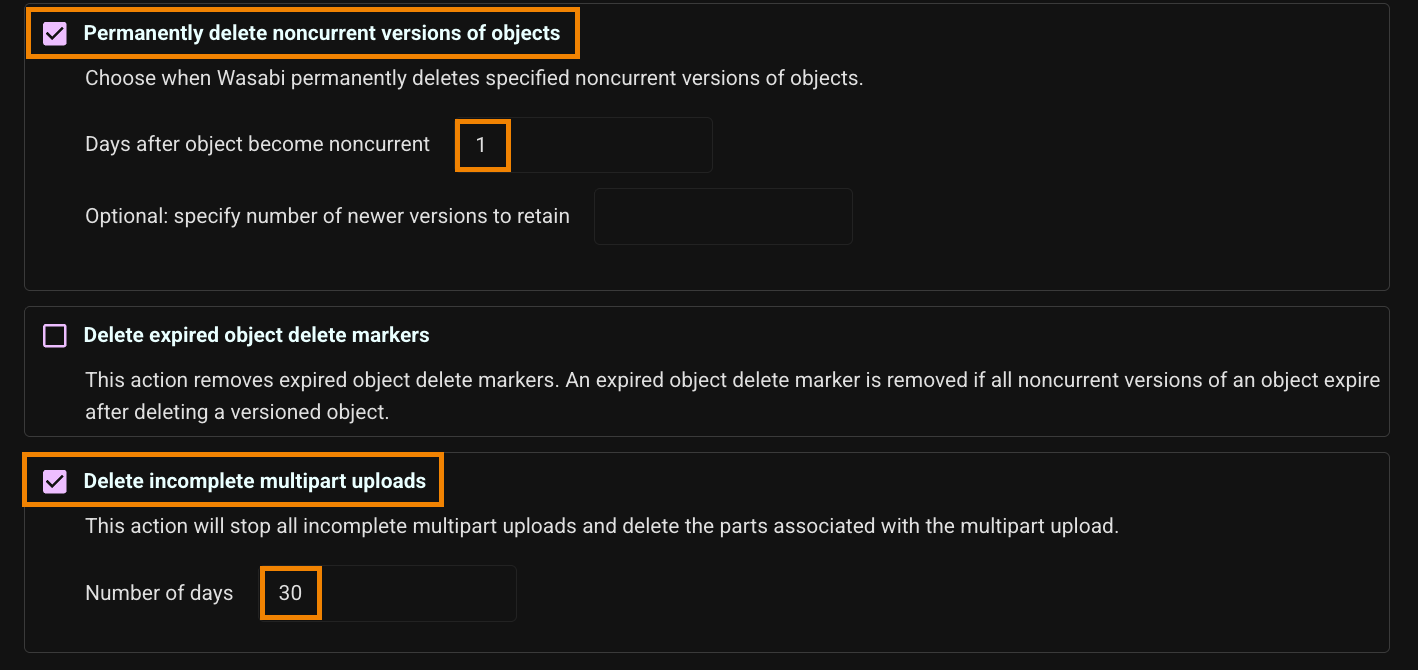
Select Permanently delete noncurrent versions of objects and enter 1 day after objects become noncurrent. S
Select Delete incomplete multipart uploads and enter 30 days. Scroll down.
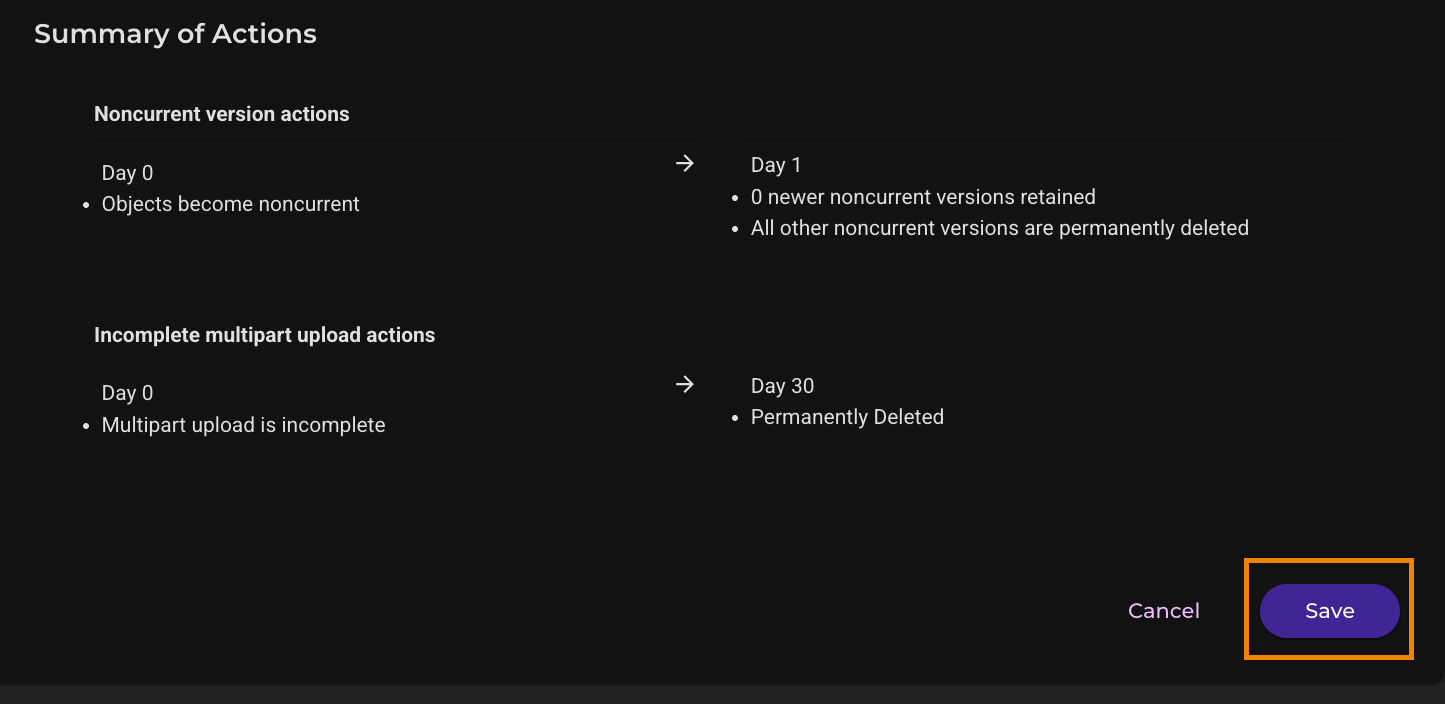
Review the Summary of Actions. Click Save.
Preparing the Redis Server
Complete these steps on the Ubuntu server that runs Redis and the scripts.
Install Python virtual environment support, then create and activate a virtual environment. Ubuntu does not allow installing Python packages system-wide.
sudo apt update
sudo apt install -y python3-full python3-venv
python3 -m venv ~/redis-demo-venv
source ~/redis-demo-venv/bin/activate
Install the Python packages.
pip install boto3 redis numpy pyarrowInstall
redis-cli, which is included inredis-tools.sudo apt install -y redis-toolsStart Redis Open Source in Docker. (This article uses the official redis:8 image, which includes the Redis query engine used for vector search. The command publishes the Redis port on the local machine only.)
docker run -d --name redis -p 127.0.0.1:6379:6379 redis:8Confirm that Redis includes the query engine (the FT.* commands).
docker exec redis redis-cli FT._LISTActivate the virtual environment in every new terminal session before you run the scripts.
source ~/redis-demo-venv/bin/activate
Configuring the Scripts
This article uses three scripts, listed at the end of the article. redis_wasabi_demo.py creates sample data in Wasabi, loads data from Wasabi into Redis, and runs a caching example. redis_wasabi_backup.py backs up Redis to Wasabi and restores from a backup. wasabi_redis_minimal.py is a short example of uploading a file to Wasabi, downloading a file from Wasabi, and loading a file into Redis. All three scripts read their Wasabi settings from environment variables.
Save
redis_wasabi_demo.py,redis_wasabi_backup.py, andwasabi_redis_minimal.pyin your home directory on the server.Add the following lines to
~/.bashrc. Replace YOUR_WASABI_ACCESS_KEY, YOUR_WASABI_SECRET_KEY, and YOUR_WASABI_BUCKET_NAME with your own values, and change the service URL and region to the storage region where your bucket is located.# Wasabi / Redis export WASABI_ACCESS_KEY="YOUR_WASABI_ACCESS_KEY" export WASABI_SECRET_KEY="YOUR_WASABI_SECRET_KEY" export WASABI_BUCKET="YOUR_WASABI_BUCKET_NAME" export WASABI_LOCK_BUCKET="YOUR_WASABI_BUCKET_NAME" export WASABI_ENDPOINT="https://s3.us-east-2.wasabisys.com" export WASABI_REGION="us-east-2" export REDIS_URL="redis://localhost:6379"This configuration example uses Wasabi’s us-east-2 storage region. To use another Wasabi storage region, use the appropriate URL in Service URLs for Wasabi’s Storage Regions. The region value must match the endpoint.
The file contains your secret key, so restrict its permissions so that only you can read it.
chmod 600 ~/.bashrcLoad the new settings.
source ~/.bashrcThe scripts connect to Wasabi with a standard S3 client pointed at your storage region’s service URL, using Signature Version 4.
def s3_client():
    return boto3.client(
        "s3",
        endpoint_url=os.environ["WASABI_ENDPOINT"],
        region_name=os.environ["WASABI_REGION"],
        aws_access_key_id=os.environ["WASABI_ACCESS_KEY"],
        aws_secret_access_key=os.environ["WASABI_SECRET_KEY"],
        config=Config(signature_version="s3v4"),
    )
Uploading and Downloading Files With Wasabi
The wasabi_redis_minimal.py script is a short example of the Wasabi operations the other scripts build on: uploading a file to Wasabi, downloading a file from Wasabi, and loading a file into Redis. Each operation is a single function of a few lines, and the script connects to Wasabi with the same S3 client settings shown above.
Create a small sample Parquet file with 1,000 documents.
python3 wasabi_redis_minimal.py sample sample.parquetExample output:
wrote sample.parquet (1000 docs, 384 dims)
Upload the file to Wasabi. The first argument is the local file and the second is the object key in your bucket.
python3 wasabi_redis_minimal.py upload sample.parquet redis-examples/sample.parquetExample output:
uploaded sample.parquet -> s3://mt-redis-ol/redis-examples/sample.parquet
Objects you upload to the Object Lock bucket are locked by the bucket’s default retention, like every other object.
Download the file from Wasabi. The first argument is the object key and the second is the local file.
python3 wasabi_redis_minimal.py download redis-examples/sample.parquet restored.parquetExample output:
downloaded s3://mt-redis-ol/redis-examples/sample.parquet -> restored.parquet
Load the downloaded file into Redis. The script creates the vector index if it does not exist.
python3 wasabi_redis_minimal.py load restored.parquetExample output:
loaded 1000 documents into Redis
The load command writes the keys doc:0 through doc:999. If you already loaded the sample data in the next section, it replaces those 1,000 documents.
Loading Data From Wasabi Into Redis
The simplest way to use Wasabi with Redis is to keep your full dataset in Wasabi and load it into Redis memory. Redis then serves every request from memory, so make sure the server has enough memory for the full dataset and its index. The seed parameter with the example redis_wasabi_demo.py script creates 100,000 sample documents with 384-dimension vectors and uploads them to Wasabi as Parquet files. The load command reads the files from Wasabi and loads them into Redis with a vector index.
Create the sample data in Wasabi.
python3 redis_wasabi_demo.py seed --count 100000 --dim 384 --prefix redis-dataExample output:
uploaded s3://mt-redis-ol/redis-data/part-00000.parquet (25000 rows, 54.3 MB)
uploaded s3://mt-redis-ol/redis-data/part-00001.parquet (25000 rows, 54.3 MB)
uploaded s3://mt-redis-ol/redis-data/part-00002.parquet (25000 rows, 54.3 MB)
uploaded s3://mt-redis-ol/redis-data/part-00003.parquet (25000 rows, 54.3 MB)Load the data from Wasabi into Redis. The
--resetoption drops any existing index and its documents before loading.python3 redis_wasabi_demo.py load --prefix redis-data --resetExample output:
dropped index idx:docs and its documents
created index idx:docs (dim=384, M=16, EF_CONSTRUCTION=200)
loaded redis-data/part-00000.parquet (25000 rows)
loaded redis-data/part-00001.parquet (25000 rows)
loaded redis-data/part-00002.parquet (25000 rows)
loaded redis-data/part-00003.parquet (25000 rows)
Caching Data From Wasabi in Redis
If your dataset is larger than the memory you want to dedicate to Redis, keep only the data your application requests in Redis. When a request arrives, the application checks Redis first. If the data is not there, the application reads it from Wasabi, stores it in Redis with a time-to-live, and returns it. The seed command writes the Parquet files with small row groups, so a cache miss reads only the row group that contains the requested document from Wasabi, not the whole file.
Run the caching example. The
--clearoption deletes any existing cache entries first.python3 redis_wasabi_demo.py cache --prefix redis-data --clearExample output (first lines):
cleared 1591 cache entries
indexed 100 row groups / 100000 docs in 0.7sThe script then requests documents at random, with a few documents requested far more often than the rest, and reports how many requests were served from Redis and how many were read from Wasabi. Use
--requeststo set the number of requests,--zipfto control how concentrated the requests are on popular documents (higher values mean a few documents receive most requests), and--ttlto set how long Redis keeps each cached document.
Backing Up Redis to Wasabi
The backup script takes a snapshot (RDB file) of the running Redis server with redis-cli and uploads it to the redis-backups/ prefix in your Object Lock bucket. The bucket’s default retention locks each backup automatically, and the lifecycle rule removes it after the retention period. The script also stores a SHA-256 checksum with each backup, which it verifies when you restore.
Run a backup.
python3 redis_wasabi_backup.py backupExample output:
sending REPLCONF capa eof
sending REPLCONF rdb-only 1
SYNC sent to master, writing bytes of bulk transfer until EOF marker to '/tmp/tmpwrvrj4zx.rdb'
Transfer finished with success after 158078143 bytes
uploaded 158.1 MB -> s3://mt-redis-ol/redis-backups/dump-20261028T022449Z.rdb
LOCKED (COMPLIANCE until 2026-10-29 02:24 UTC)Output labeled “Example” was captured during testing. The retention date in your output depends on the default retention period you configure on the bucket.
List the stored backups and their Object Lock status.
python3 redis_wasabi_backup.py listExample output:
redis-backups/dump-20261028T022449Z.rdb 158.1 MB current LOCKED (COMPLIANCE until 2026-10-29 02:24 UTC)
redis-backups/dump-20261028T024122Z.rdb 156.5 MB current LOCKED (COMPLIANCE until 2026-10-29 02:41 UTC)
redis-backups/dump-20261028T033002Z.rdb 156.5 MB current LOCKED (COMPLIANCE until 2026-10-29 03:30 UTC)To run backups daily, save your Wasabi settings in a file that cron can read. Cron does not read
~/.bashrc.grep -E '^export (WASABI|REDIS)_' ~/.bashrc > ~/.wasabi_env chmod 600 ~/.wasabi_envRun
crontab -eand add the following line, which runs a backup every day at 02:00 server time. The line calls the virtual environment’s Python directly, so you do not need to activate the environment.
0 2 * * * . $HOME/.wasabi_env && $HOME/redis-demo-venv/bin/python $HOME/redis_wasabi_backup.py backup >> $HOME/redis_backup.log 2>&1After the job runs, check the log.
cat ~/redis_backup.logExample output:
sending REPLCONF capa eof
sending REPLCONF rdb-only 1
SYNC sent to master, writing bytes of bulk transfer until EOF marker to '/tmp/tmpf8hxhz35.rdb'
Transfer finished with success after 156501415 bytes
uploaded 156.5 MB -> s3://mt-redis-ol/redis-backups/dump-20261028T033002Z.rdb
LOCKED (COMPLIANCE until 2026-10-29 03:30 UTC)
Restoring Redis From a Backup
The restore command downloads a backup from Wasabi, verifies its checksum, and prints a docker run command that starts a Redis server loaded with the backup. Issue the docker run command that the script generates.
Download the newest backup.
python3 redis_wasabi_backup.py restoreExample output:
downloaded s3://mt-redis-ol/redis-backups/dump-20261104T010711Z.rdb -> ./restore/dump.rdb
checksum OKStart a Redis that loads it:
docker run -d --name redis-restore -p 127.0.0.1:6380:6379 -v /home/user/restore:/data redis:8If a container named redis-restore already exists, remove it, then run the docker run command from the output above.
docker rm -f redis-restoreWait for Redis to finish loading the backup then check the log.
docker logs redis-restore | tail -3Example output:
1:M 04 Nov 2026 01:09:03.974 * DB loaded from disk: 30.930 seconds
1:M 04 Nov 2026 01:09:03.974 * Ready to accept connections tcp
1:M 04 Nov 2026 01:09:03.974 # WARNING: Redis does not require authentication and is not protected by network restrictions. Redis will accept connections from any IP address on any network interface.Redis prints this warning from inside the container. The docker run command above publishes the port on 127.0.0.1 only, so the server is not reachable from other machines.
Confirm that the data and the index were restored.
Example commands and output:
$ redis-cli -p 6380 DBSIZE
(integer) 101592
$ redis-cli -p 6380 FT._LIST
1) idx:docs
The key count includes every key in the snapshot, not only the sample documents.
To restore an older backup instead of the newest, find its name with the
listcommand, then use the--keyand--destoptions. The script prints the matching docker run command. Change the container name and port in that command if another restore container is running. An example command from testing:$ python3 redis_wasabi_backup.py list
redis-backups/dump-20261028T022449Z.rdb 158.1 MB current LOCKED (COMPLIANCE until 2026-10-29 02:24 UTC)
redis-backups/dump-20261028T024122Z.rdb 156.5 MB current LOCKED (COMPLIANCE until 2026-10-29 02:41 UTC)
$python3 redis_wasabi_backup.py restore --key dump-20261028T022449Z.rdb --dest ./restore-orig/dump.rdb
downloaded s3://mt-redis-ol/redis-backups/dump-20261028T022449Z.rdb -> ./restore-orig/dump.rdb
checksum OKStart a Redis that loads it:
docker run -d --name redis-restore -p 6380:6379 -v /home/mtowle/restore-orig:/data redis:8
Verifying Data in Your Wasabi Bucket
You can confirm the scripts are writing to Wasabi by browsing the bucket contents in the Wasabi Console.
Log in to the Wasabi Console.
Click Buckets in the left navigation.
Select the name of your bucket.
Confirm that the
redis-backupsandredis-datafolders appear with objects inside.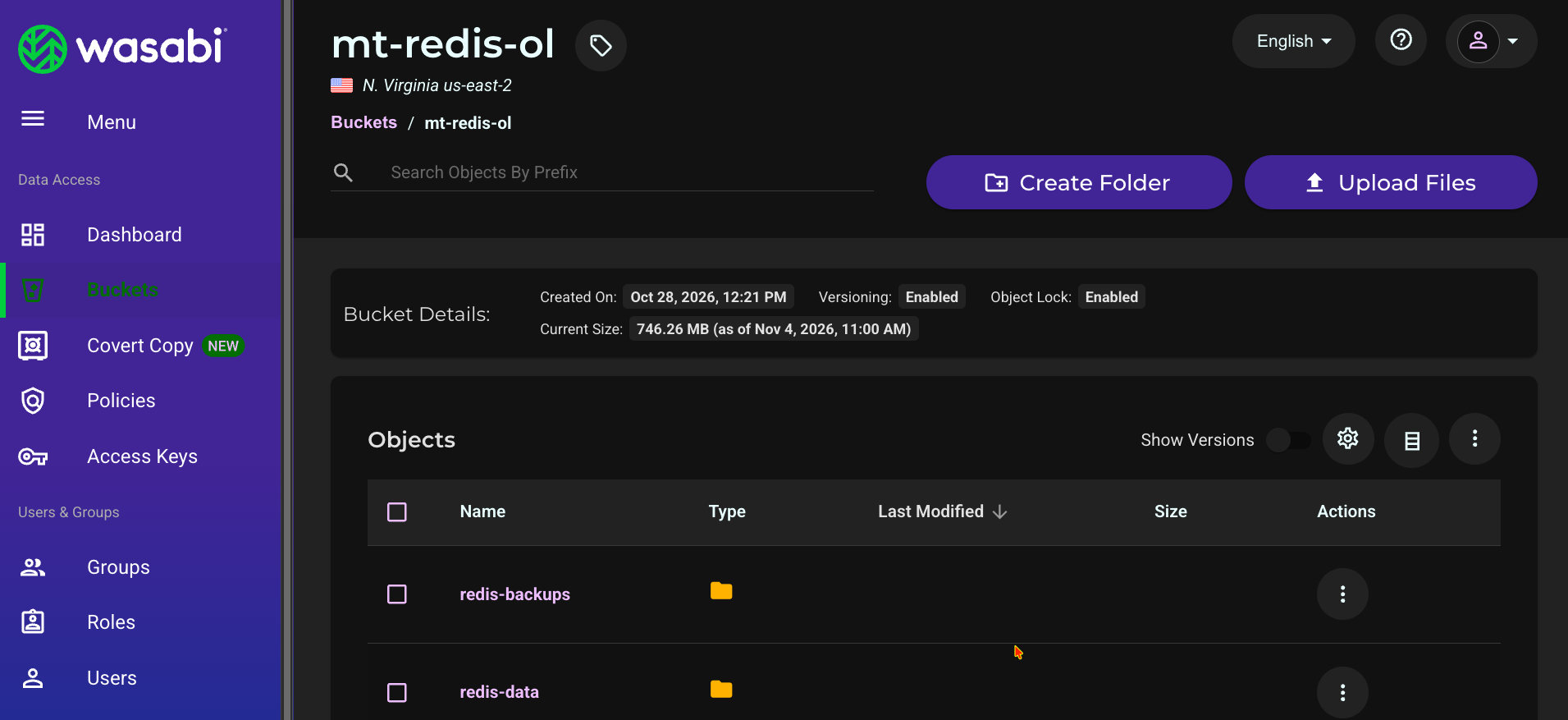
Security Considerations
Publish the Redis port on the local machine only, as in the docker run commands in this article, or protect it with a firewall. Redis Open Source does not require a password by default, so require a password or an access control list (ACL) user for any remote access.
If REDIS_URL contains a password, keep it in a file that only you can read (
chmod 600), not on the command line. Use arediss://URL to connect to a remote Redis server over TLS.Limit the Wasabi user’s policy to the bucket the scripts use, as is done in this article.
Performance
There will be performance differences between reading data from Redis memory and reading data from Wasabi. Redis serves data in memory, while data that is not yet in Redis must be read from Wasabi first, so the first request for that data takes longer than later requests. Network latency between your server and your Wasabi storage region, and the size of your dataset, affect how long loading and restoring take.
Script: redis_wasabi_demo.py
Save the following script as redis_wasabi_demo.py.
#!/usr/bin/env python3
"""
Redis Open Source + Wasabi test harness (v2)

Wasabi holds the source of truth (Parquet: id, title, embedding).
Redis holds a working set in RAM.

Subcommands
  seed    Generate sample data and upload to Wasabi as Parquet
  load    Read Parquet from Wasabi and load into Redis (HSET + HNSW index)
  query   Quick latency check (single client)
  bench   Recall@k against exact search + latency/QPS at several client counts
  cache   Cache-aside test: look up documents by id in Redis, fall back to
          Wasabi on a miss (ranged read of a single Parquet row group)

Environment variables
  WASABI_ACCESS_KEY, WASABI_SECRET_KEY, WASABI_BUCKET   (required)
  WASABI_ENDPOINT   default https://s3.us-east-1.wasabisys.com
  WASABI_REGION     default us-east-1  (must match the endpoint's region)
  REDIS_URL         default redis://localhost:6379

Requires a Redis build with the query engine (FT.* commands), e.g. redis:8.
Install: pip install boto3 redis numpy pyarrow
"""
import argparse
import bisect
import io
import os
import time
from concurrent.futures import ThreadPoolExecutor

import boto3
import numpy as np
import pyarrow as pa
import pyarrow.parquet as pq
import redis
from botocore.config import Config
from redis.commands.search.field import TextField, VectorField
from redis.commands.search.index_definition import IndexDefinition, IndexType
from redis.commands.search.query import Query

INDEX = "idx:docs"
PREFIX = "doc:"          # indexed documents (used by load / query / bench)
CACHE_PREFIX = "cache:"  # cache-aside entries (not indexed)


# ----------------------------------------------------------------------------
# Connections
# ----------------------------------------------------------------------------
def s3_client():
    return boto3.client(
        "s3",
        endpoint_url=os.environ.get("WASABI_ENDPOINT", "https://s3.us-east-1.wasabisys.com"),
        region_name=os.environ.get("WASABI_REGION", "us-east-1"),
        aws_access_key_id=os.environ["WASABI_ACCESS_KEY"],
        aws_secret_access_key=os.environ["WASABI_SECRET_KEY"],
        config=Config(signature_version="s3v4"),
    )


def redis_client():
    # decode_responses stays False: vectors are binary blobs
    return redis.Redis.from_url(os.environ.get("REDIS_URL", "redis://localhost:6379"))


def list_parquet_keys(s3, bucket, prefix):
    keys = []
    for page in s3.get_paginator("list_objects_v2").paginate(Bucket=bucket, Prefix=prefix + "/"):
        keys += [o["Key"] for o in page.get("Contents", []) if o["Key"].endswith(".parquet")]
    if not keys:
        raise SystemExit(f"no parquet files under s3://{bucket}/{prefix}/")
    return sorted(keys)


def normalized(n, dim, rng):
    v = rng.standard_normal((n, dim)).astype(np.float32)
    v /= np.linalg.norm(v, axis=1, keepdims=True)
    return v


def pct(values, p):
    """Percentile of a list of numbers (0 if empty)."""
    return float(np.percentile(values, p)) if len(values) else 0.0


# ----------------------------------------------------------------------------
# seed
# ----------------------------------------------------------------------------
def cmd_seed(args):
    s3 = s3_client()
    bucket = os.environ["WASABI_BUCKET"]
    rng = np.random.default_rng(42)
    for part, start in enumerate(range(0, args.count, args.part_size)):
        n = min(args.part_size, args.count - start)
        vecs = normalized(n, args.dim, rng)
        table = pa.table(
            {
                "id": pa.array(range(start, start + n), type=pa.int64()),
                "title": pa.array([f"document {i}" for i in range(start, start + n)]),
                "embedding": pa.array(list(vecs), type=pa.list_(pa.float32())),
            }
        )
        buf = io.BytesIO()
        # Small row groups let the cache-aside test fetch one document's
        # neighbourhood with a ranged read instead of a whole file.
        pq.write_table(table, buf, row_group_size=args.row_group_size)
        key = f"{args.prefix}/part-{part:05d}.parquet"
        s3.put_object(Bucket=bucket, Key=key, Body=buf.getvalue())
        print(f"uploaded s3://{bucket}/{key} ({n} rows, {buf.tell() / 1e6:.1f} MB)")


# ----------------------------------------------------------------------------
# load
# ----------------------------------------------------------------------------
def ensure_index(r, dim, m, ef_construction, reset=False):
    if reset:
        try:
            r.ft(INDEX).dropindex(delete_documents=True)
            print(f"dropped index {INDEX} and its documents")
        except redis.ResponseError:
            pass
    try:
        r.ft(INDEX).info()
        return
    except redis.ResponseError:
        pass
    r.ft(INDEX).create_index(
        (
            TextField("title"),
            VectorField(
                "embedding",
                "HNSW",
                {
                    "TYPE": "FLOAT32",
                    "DIM": dim,
                    "DISTANCE_METRIC": "COSINE",
                    "M": m,
                    "EF_CONSTRUCTION": ef_construction,
                },
            ),
        ),
        definition=IndexDefinition(prefix=[PREFIX], index_type=IndexType.HASH),
    )
    print(f"created index {INDEX} (dim={dim}, M={m}, EF_CONSTRUCTION={ef_construction})")


def cmd_load(args):
    s3, r = s3_client(), redis_client()
    bucket = os.environ["WASABI_BUCKET"]
    keys = list_parquet_keys(s3, bucket, args.prefix)
    if args.max_files:
        keys = keys[: args.max_files]

    t_download = t_insert = 0.0
    total, index_ready = 0, False
    for key in keys:
        t0 = time.perf_counter()
        body = s3.get_object(Bucket=bucket, Key=key)["Body"].read()
        table = pq.read_table(io.BytesIO(body))
        t_download += time.perf_counter() - t0

        ids = table["id"].to_pylist()
        titles = table["title"].to_pylist()
        vecs = np.array(table["embedding"].to_pylist(), dtype=np.float32)
        if not index_ready:
            ensure_index(r, vecs.shape[1], args.m, args.ef_construction, args.reset)
            index_ready = True

        t0 = time.perf_counter()
        pipe = r.pipeline(transaction=False)
        for i, (doc_id, title, vec) in enumerate(zip(ids, titles, vecs), 1):
            name = f"{PREFIX}{doc_id}"
            pipe.hset(name, mapping={"title": title, "embedding": vec.tobytes()})
            if args.ttl:
                pipe.expire(name, args.ttl)
            if i % 1000 == 0:
                pipe.execute()
        pipe.execute()
        t_insert += time.perf_counter() - t0
        total += len(ids)
        print(f"loaded {key} ({len(ids)} rows)")

    print(
        f"\n{total} docs | Wasabi download+parse: {t_download:.1f}s | "
        f"Redis insert: {t_insert:.1f}s | "
        f"Redis memory: {r.info('memory')['used_memory_human']}"
    )


# ----------------------------------------------------------------------------
# query / bench
# ----------------------------------------------------------------------------
def knn_query(k, ef_runtime):
    ef = f" EF_RUNTIME {ef_runtime}" if ef_runtime else ""
    return (
        Query(f"*=>[KNN {k} @embedding $vec{ef} AS score]")
        .sort_by("score")
        .return_fields("title", "score")
        .dialect(2)
    )


def cmd_query(args):
    r = redis_client()
    queries = normalized(args.n, args.dim, np.random.default_rng(7))
    q = knn_query(args.k, args.ef_runtime)
    lat, last = [], None
    for vec in queries:
        t0 = time.perf_counter()
        last = r.ft(INDEX).search(q, query_params={"vec": vec.tobytes()})
        lat.append((time.perf_counter() - t0) * 1000)
    print(f"{args.n} queries, k={args.k}, ef_runtime={args.ef_runtime or 'default (10)'}")
    print(f"p50={pct(lat, 50):.2f} ms  p95={pct(lat, 95):.2f} ms  max={max(lat):.2f} ms")
    print("sample:", [(d.id, d.score) for d in last.docs][:3])


def fetch_all_vectors(s3, bucket, prefix):
    ids, vecs = [], []
    for key in list_parquet_keys(s3, bucket, prefix):
        table = pq.read_table(io.BytesIO(s3.get_object(Bucket=bucket, Key=key)["Body"].read()))
        ids.append(np.array(table["id"].to_pylist(), dtype=np.int64))
        vecs.append(np.array(table["embedding"].to_pylist(), dtype=np.float32))
    return np.concatenate(ids), np.concatenate(vecs)


def exact_top_k(all_vecs, all_ids, query_idx, k):
    """Brute-force top-k (excluding each query's own row) using cosine == dot
    product on unit vectors. Returns a list of sets of doc ids."""
    truth = []
    for start in range(0, len(query_idx), 100):  # chunk to bound memory
        chunk = query_idx[start : start + 100]
        scores = all_vecs[chunk] @ all_vecs.T            # (chunk, N)
        scores[np.arange(len(chunk)), chunk] = -np.inf   # drop self-match
        top = np.argpartition(-scores, k, axis=1)[:, :k]
        truth += [set(all_ids[row].tolist()) for row in top]
    return truth


def recall_at_k(found, truth):
    """Mean fraction of the exact top-k that the approximate search returned."""
    return float(np.mean([len(f & t) / len(t) for f, t in zip(found, truth)]))


def cmd_bench(args):
    s3, r = s3_client(), redis_client()
    bucket = os.environ["WASABI_BUCKET"]

    print("Fetching vectors from Wasabi for exact ground truth ...")
    all_ids, all_vecs = fetch_all_vectors(s3, bucket, args.prefix)
    rng = np.random.default_rng(7)
    query_idx = rng.choice(len(all_ids), size=args.n, replace=False)
    truth = exact_top_k(all_vecs, all_ids, query_idx, args.k)

    q = knn_query(args.k + 1, args.ef_runtime)  # +1: result includes the query doc itself

    def run_one(i):
        vec = all_vecs[query_idx[i]]
        t0 = time.perf_counter()
        res = r.ft(INDEX).search(q, query_params={"vec": vec.tobytes()})
        ms = (time.perf_counter() - t0) * 1000
        self_id = int(all_ids[query_idx[i]])
        ordered = [int(d.id[len(PREFIX):]) for d in res.docs]       # nearest first
        found = [x for x in ordered if x != self_id][: args.k]      # drop self, keep k
        return ms, set(found)

    print(f"\nn={args.n} k={args.k} ef_runtime={args.ef_runtime or 'default (10)'}")
    print(f"{'clients':>8} {'QPS':>9} {'p50 ms':>8} {'p95 ms':>8} {'p99 ms':>8} {'recall@k':>9}")
    for clients in [int(c) for c in args.clients.split(",")]:
        t0 = time.perf_counter()
        with ThreadPoolExecutor(max_workers=clients) as pool:
            results = list(pool.map(run_one, range(args.n)))
        wall = time.perf_counter() - t0
        lat = [ms for ms, _ in results]
        rec = recall_at_k([f for _, f in results], truth)
        print(
            f"{clients:>8} {args.n / wall:>9.0f} {pct(lat, 50):>8.2f} "
            f"{pct(lat, 95):>8.2f} {pct(lat, 99):>8.2f} {rec:>9.3f}"
        )
    print(
        "\nNote: the Python client is the bottleneck at high client counts, so QPS "
        "is a lower bound for what Redis can serve."
    )


# ----------------------------------------------------------------------------
# cache-aside
# ----------------------------------------------------------------------------
class S3File(io.RawIOBase):
    """Seekable read-only file backed by ranged GETs, so pyarrow can read one
    Parquet row group from Wasabi without downloading the whole object."""

    def __init__(self, s3, bucket, key):
        self.s3, self.bucket, self.key = s3, bucket, key
        self.size = s3.head_object(Bucket=bucket, Key=key)["ContentLength"]
        self.pos = 0

    def readable(self):
        return True

    def seekable(self):
        return True

    def tell(self):
        return self.pos

    def seek(self, offset, whence=io.SEEK_SET):
        if whence == io.SEEK_SET:
            self.pos = offset
        elif whence == io.SEEK_CUR:
            self.pos += offset
        else:
            self.pos = self.size + offset
        return self.pos

    def read(self, n=-1):
        end = self.size if n is None or n < 0 else min(self.pos + n, self.size)
        if self.pos >= end:
            return b""
        data = self.s3.get_object(
            Bucket=self.bucket, Key=self.key, Range=f"bytes={self.pos}-{end - 1}"
        )["Body"].read()
        self.pos += len(data)
        return data

    def readinto(self, b):
        data = self.read(len(b))
        b[: len(data)] = data
        return len(data)


class WasabiDocStore:
    """Looks up one document by id with a single ranged read from Wasabi.

    At start-up it reads each Parquet footer (a few KB) to learn which file
    and row group holds which id range. Not thread-safe (one reader position
    per file) - the cache test is single-threaded on purpose."""

    def __init__(self, s3, bucket, prefix):
        self.files = {}
        self.ranges = []  # (min_id, max_id, key, row_group)
        for key in list_parquet_keys(s3, bucket, prefix):
            pf = pq.ParquetFile(S3File(s3, bucket, key))
            self.files[key] = pf
            md = pf.metadata
            for rg in range(md.num_row_groups):
                st = md.row_group(rg).column(0).statistics  # column 0 == id
                self.ranges.append((st.min, st.max, key, rg))
        self.ranges.sort()
        self.lows = [r[0] for r in self.ranges]
        self.count = max(r[1] for r in self.ranges) + 1

    def get(self, doc_id):
        i = bisect.bisect_right(self.lows, doc_id) - 1
        lo, hi, key, rg = self.ranges[i]
        if not lo <= doc_id <= hi:
            return None
        table = self.files[key].read_row_group(rg)
        row = int(np.flatnonzero(np.array(table["id"].to_pylist()) == doc_id)[0])
        return {
            "title": table["title"][row].as_py(),
            "embedding": np.array(table["embedding"][row].as_py(), dtype=np.float32).tobytes(),
        }


def cache_aside_get(r, store, doc_id, ttl):
    """Returns (document, was_hit)."""
    name = f"{CACHE_PREFIX}{doc_id}"
    doc = r.hgetall(name)
    if doc:
        return doc, True
    doc = store.get(doc_id)          # miss: read from Wasabi
    if doc is not None:
        pipe = r.pipeline(transaction=False)
        pipe.hset(name, mapping=doc)
        pipe.expire(name, ttl)
        pipe.execute()
    return doc, False


def cmd_cache(args):
    s3, r = s3_client(), redis_client()
    bucket = os.environ["WASABI_BUCKET"]

    if args.clear:
        removed = 0
        for k in r.scan_iter(match=f"{CACHE_PREFIX}*", count=1000):
            r.unlink(k)
            removed += 1
        print(f"cleared {removed} cache entries")

    t0 = time.perf_counter()
    store = WasabiDocStore(s3, bucket, args.prefix)
    print(f"indexed {len(store.ranges)} row groups / {store.count} docs "
          f"in {time.perf_counter() - t0:.1f}s")

    # Skewed (zipf) access pattern: a few documents are requested far more than
    # the rest, like real workloads. Permute so hot ids are spread across files.
    rng = np.random.default_rng(11)
    perm = rng.permutation(store.count)
    ids = perm[(rng.zipf(args.zipf, size=args.requests) - 1) % store.count]

    expected_misses = len(set(ids.tolist()))
    print(f"running {args.requests} requests; expect about {expected_misses} misses "
          f"(each is a ranged read from Wasabi). Ctrl+C prints partial results.", flush=True)

    hit_ms, miss_ms, all_ms, hits = [], [], [], []
    try:
        for n, doc_id in enumerate(ids, 1):
            t0 = time.perf_counter()
            _, hit = cache_aside_get(r, store, int(doc_id), args.ttl)
            ms = (time.perf_counter() - t0) * 1000
            (hit_ms if hit else miss_ms).append(ms)
            all_ms.append(ms)
            hits.append(hit)
            if n % args.progress == 0:
                print(f"  {n}/{args.requests}  hit ratio {np.mean(hits):.0%}  "
                      f"misses {len(miss_ms)}  avg miss {np.mean(miss_ms) if miss_ms else 0:.0f} ms",
                      flush=True)
    except KeyboardInterrupt:
        print("\ninterrupted - showing partial results")
    if not hits:
        return

    done = len(hits)
    print(f"\n{done} requests, zipf={args.zipf}, ttl={args.ttl}s, "
          f"{len(set(ids[:done].tolist()))} distinct ids")
    print(f"hit ratio overall: {np.mean(hits):.1%}")
    window = max(1, done // 10)
    print("hit ratio by 10% window:",
          " ".join(f"{np.mean(hits[i:i + window]):.0%}" for i in range(0, done, window)))
    print(f"\n{'':>8} {'count':>7} {'p50 ms':>9} {'p95 ms':>9} {'p99 ms':>9}")
    for label, v in (("hit", hit_ms), ("miss", miss_ms), ("overall", all_ms)):
        print(f"{label:>8} {len(v):>7} {pct(v, 50):>9.2f} {pct(v, 95):>9.2f} {pct(v, 99):>9.2f}")


# ----------------------------------------------------------------------------
def main():
    p = argparse.ArgumentParser(description=__doc__, formatter_class=argparse.RawDescriptionHelpFormatter)
    sub = p.add_subparsers(dest="cmd", required=True)

    s = sub.add_parser("seed", help="generate sample Parquet data in Wasabi")
    s.add_argument("--count", type=int, default=100_000)
    s.add_argument("--dim", type=int, default=384)
    s.add_argument("--part-size", type=int, default=25_000)
    s.add_argument("--row-group-size", type=int, default=1_000)
    s.add_argument("--prefix", default="redis-test")
    s.set_defaults(fn=cmd_seed)

    l = sub.add_parser("load", help="load Parquet from Wasabi into Redis")
    l.add_argument("--prefix", default="redis-test")
    l.add_argument("--ttl", type=int, default=0, help="optional TTL (seconds) per doc")
    l.add_argument("--max-files", type=int, default=0, help="load only the first N files (working-set test)")
    l.add_argument("--m", type=int, default=16, help="HNSW M (default 16)")
    l.add_argument("--ef-construction", type=int, default=200)
    l.add_argument("--reset", action="store_true", help="drop the index and its docs first")
    l.set_defaults(fn=cmd_load)

    q = sub.add_parser("query", help="quick single-client latency check")
    q.add_argument("--n", type=int, default=500)
    q.add_argument("--k", type=int, default=10)
    q.add_argument("--dim", type=int, default=384)
    q.add_argument("--ef-runtime", type=int, default=0, help="0 = Redis default (10)")
    q.set_defaults(fn=cmd_query)

    b = sub.add_parser("bench", help="recall@k + latency/QPS at several client counts")
    b.add_argument("--prefix", default="redis-test")
    b.add_argument("--n", type=int, default=1000)
    b.add_argument("--k", type=int, default=10)
    b.add_argument("--clients", default="1,8,32")
    b.add_argument("--ef-runtime", type=int, default=0, help="0 = Redis default (10)")
    b.set_defaults(fn=cmd_bench)

    c = sub.add_parser("cache", help="cache-aside test with Wasabi fallback")
    c.add_argument("--prefix", default="redis-test")
    c.add_argument("--requests", type=int, default=2000)
    c.add_argument("--zipf", type=float, default=1.5, help="higher = more skewed = fewer distinct ids = fewer misses")
    c.add_argument("--ttl", type=int, default=3600)
    c.add_argument("--clear", action="store_true", help="delete existing cache entries first")
    c.add_argument("--progress", type=int, default=100, help="print progress every N requests")
    c.set_defaults(fn=cmd_cache)

    args = p.parse_args()
    args.fn(args)


if __name__ == "__main__":
    main()
Script: redis_wasabi_backup.py
Save the following script as redis_wasabi_backup.py.
#!/usr/bin/env python3
"""
Redis snapshot (RDB) backups to a Wasabi Object Lock bucket.

Retention and expiry are handled by the BUCKET, not this script:
  - bucket default Object Lock retention locks every new object
  - bucket lifecycle rules delete old backups after the lock expires

  backup    take an RDB snapshot and upload it
  list      show every stored version, its lock status, and delete markers
  restore   download the newest backup (or --key NAME) and verify its checksum

Environment variables
  WASABI_ACCESS_KEY, WASABI_SECRET_KEY
  WASABI_LOCK_BUCKET   an Object Lock bucket with default retention set
  WASABI_ENDPOINT      e.g. https://s3.us-east-2.wasabisys.com
  WASABI_REGION        e.g. us-east-2  (must match the bucket)
  REDIS_URL            default redis://localhost:6379

`backup` needs redis-cli on this machine (sudo apt install redis-tools),
or pass --rdb-file to upload an existing dump.rdb.
"""
import argparse
import hashlib
import os
import subprocess
import sys
import tempfile
from datetime import datetime, timezone
from urllib.parse import urlparse

import boto3
from botocore.config import Config

PREFIX = "redis-backups/"
BUCKET = os.environ.get("WASABI_LOCK_BUCKET", "")


def s3_client():
    return boto3.client(
        "s3",
        endpoint_url=os.environ["WASABI_ENDPOINT"],
        region_name=os.environ["WASABI_REGION"],
        aws_access_key_id=os.environ["WASABI_ACCESS_KEY"],
        aws_secret_access_key=os.environ["WASABI_SECRET_KEY"],
        config=Config(signature_version="s3v4"),
    )


def sha256_file(path):
    h = hashlib.sha256()
    with open(path, "rb") as f:
        for chunk in iter(lambda: f.read(1024 * 1024), b""):
            h.update(chunk)
    return h.hexdigest()


def take_snapshot(path):
    """Pull a consistent RDB from the running server with redis-cli --rdb
    (no access to the Redis host's or container's files needed)."""
    u = urlparse(os.environ.get("REDIS_URL", "redis://localhost:6379"))
    cmd = ["redis-cli", "-h", u.hostname or "localhost", "-p", str(u.port or 6379), "--rdb", path]
    env = dict(os.environ)
    if u.password:
        env["REDISCLI_AUTH"] = u.password  # keeps the password out of `ps`
    subprocess.run(cmd, check=True, env=env)


def lock_text(mode, until):
    if not mode or not until:
        return "not locked"
    state = "lock expired" if until < datetime.now(timezone.utc) else "LOCKED"
    return f"{state} ({mode} until {until:%Y-%m-%d %H:%M UTC})"


# ----------------------------------------------------------------------------
def cmd_backup(args):
    s3 = s3_client()
    key = f"{PREFIX}dump-{datetime.now(timezone.utc):%Y%m%dT%H%M%SZ}.rdb"
    path, tmp = args.rdb_file, None
    if not path:
        tmp = tempfile.NamedTemporaryFile(suffix=".rdb", delete=False)
        tmp.close()
        path = tmp.name
        take_snapshot(path)

    # No retention settings here: the bucket's default retention applies.
    s3.upload_file(path, BUCKET, key, ExtraArgs={"Metadata": {"sha256": sha256_file(path)}})
    head = s3.head_object(Bucket=BUCKET, Key=key)
    print(f"uploaded {os.path.getsize(path) / 1e6:.1f} MB -> s3://{BUCKET}/{key}")
    print("  " + lock_text(head.get("ObjectLockMode"), head.get("ObjectLockRetainUntilDate")))
    if tmp:
        os.unlink(path)


def cmd_list(args):
    s3 = s3_client()
    found = False
    for page in s3.get_paginator("list_object_versions").paginate(Bucket=BUCKET, Prefix=PREFIX):
        for v in page.get("Versions", []):
            found = True
            head = s3.head_object(Bucket=BUCKET, Key=v["Key"], VersionId=v["VersionId"])
            state = "current   " if v["IsLatest"] else "noncurrent"
            print(f"{v['Key']}  {v['Size'] / 1e6:7.1f} MB  {state}  "
                  f"{lock_text(head.get('ObjectLockMode'), head.get('ObjectLockRetainUntilDate'))}")
        for m in page.get("DeleteMarkers", []):
            found = True
            print(f"{m['Key']}  delete marker created {m['LastModified']:%Y-%m-%d %H:%M UTC}")
    if not found:
        print("no backups found")


def latest_version(s3, key):
    """Newest stored version of an exact key, current or not (a backup whose
    lifecycle delete marker has been added is still restorable until its
    noncurrent version is physically deleted)."""
    versions = []
    for page in s3.get_paginator("list_object_versions").paginate(Bucket=BUCKET, Prefix=key):
        versions += [v for v in page.get("Versions", []) if v["Key"] == key]
    return max(versions, key=lambda v: v["LastModified"])["VersionId"] if versions else None


def cmd_restore(args):
    s3 = s3_client()
    extra = {}
    if args.key:  # a specific backup: full key or just the file name
        key = args.key if args.key.startswith(PREFIX) else PREFIX + args.key
        version = latest_version(s3, key)
        if not version:
            sys.exit(f"no backup named {key} (run 'list' to see what exists)")
        extra = {"VersionId": version}
    else:  # default: the newest current backup
        objs = []
        for page in s3.get_paginator("list_objects_v2").paginate(Bucket=BUCKET, Prefix=PREFIX):
            objs += page.get("Contents", [])
        if not objs:
            sys.exit("no current backups found (lifecycle may have expired them)")
        key = max(objs, key=lambda o: o["LastModified"])["Key"]

    os.makedirs(os.path.dirname(os.path.abspath(args.dest)), exist_ok=True)
    s3.download_file(BUCKET, key, args.dest, ExtraArgs=extra or None)
    expected = s3.head_object(Bucket=BUCKET, Key=key, **extra).get("Metadata", {}).get("sha256")
    actual = sha256_file(args.dest)
    print(f"downloaded s3://{BUCKET}/{key} -> {args.dest}")
    if expected and expected != actual:
        sys.exit("CHECKSUM MISMATCH")
    print("checksum OK")
    d = os.path.dirname(os.path.abspath(args.dest))
    print(f"\nStart a Redis that loads it:\n  docker run -d --name redis-restore -p 127.0.0.1:6380:6379 -v {d}:/data redis:8")


def main():
    p = argparse.ArgumentParser(description=__doc__, formatter_class=argparse.RawDescriptionHelpFormatter)
    sub = p.add_subparsers(dest="cmd", required=True)
    b = sub.add_parser("backup")
    b.add_argument("--rdb-file", help="upload this existing RDB instead of taking a snapshot")
    b.set_defaults(fn=cmd_backup)
    sub.add_parser("list").set_defaults(fn=cmd_list)
    r = sub.add_parser("restore")
    r.add_argument("--key", help="restore this backup (file name or full key) instead of the newest")
    r.add_argument("--dest", default="./restore/dump.rdb")
    r.set_defaults(fn=cmd_restore)
    args = p.parse_args()
    if not BUCKET:
        sys.exit("set WASABI_LOCK_BUCKET")
    args.fn(args)


if __name__ == "__main__":
    main()
Script: wasabi_redis_minimal.py
Save the following script as wasabi_redis_minimal.py.
#!/usr/bin/env python3
"""
Minimal example: move data between Wasabi object storage and Redis Open Source.

  sample    (optional) create a small local Parquet file to experiment with
  upload    local file  -> Wasabi bucket
  download  Wasabi bucket -> local file
  load      Parquet file (local) -> Redis hashes + vector index

Prerequisites
  pip install boto3 redis numpy pyarrow
  A Redis build with the query engine (FT.* commands), e.g. the redis:8 image

Environment variables
  WASABI_ACCESS_KEY, WASABI_SECRET_KEY, WASABI_BUCKET
  WASABI_ENDPOINT  (e.g. https://s3.us-east-1.wasabisys.com)
  WASABI_REGION    (e.g. us-east-1) - must match the bucket's region
  REDIS_URL        (default redis://localhost:6379)

Security notes
  - Run Redis bound to localhost (docker run -p 127.0.0.1:6379:6379 ...) or behind a
    firewall, and require a password/ACL user for any remote access.
  - REDIS_URL may contain a password (redis://user:pass@host:6379; rediss:// for TLS):
    keep it in a chmod 600 env file, not on the command line.
  - Use a Wasabi access key scoped to this one bucket.

Examples
  python3 wasabi_redis_minimal.py sample sample.parquet
  python3 wasabi_redis_minimal.py upload sample.parquet redis-examples/sample.parquet
  python3 wasabi_redis_minimal.py download redis-examples/sample.parquet restored.parquet
  python3 wasabi_redis_minimal.py load restored.parquet
"""
import os
import sys

import boto3
import numpy as np
import pyarrow as pa
import pyarrow.parquet as pq
import redis
from botocore.config import Config
from redis.commands.search.field import TextField, VectorField
from redis.commands.search.index_definition import IndexDefinition, IndexType

# ---------------------------------------------------------------------------
# 0. Wasabi connection - the only Wasabi-specific part
#    Wasabi is S3-compatible: point the standard S3 client at your region's
#    endpoint and use Signature Version 4.
# ---------------------------------------------------------------------------
BUCKET = os.environ["WASABI_BUCKET"]

s3 = boto3.client(
    "s3",
    endpoint_url=os.environ["WASABI_ENDPOINT"],        # https://s3.<region>.wasabisys.com
    region_name=os.environ["WASABI_REGION"],           # must match the endpoint
    aws_access_key_id=os.environ["WASABI_ACCESS_KEY"],
    aws_secret_access_key=os.environ["WASABI_SECRET_KEY"],
    config=Config(signature_version="s3v4"),
)


# ---------------------------------------------------------------------------
# 1. Upload to Wasabi
# ---------------------------------------------------------------------------
def upload(local_path, key):
    s3.upload_file(local_path, BUCKET, key)  # handles multipart for large files
    print(f"uploaded {local_path} -> s3://{BUCKET}/{key}")


# ---------------------------------------------------------------------------
# 2. Download from Wasabi
# ---------------------------------------------------------------------------
def download(key, local_path):
    s3.download_file(BUCKET, key, local_path)
    print(f"downloaded s3://{BUCKET}/{key} -> {local_path}")


# ---------------------------------------------------------------------------
# 3. Load into Redis (hashes + HNSW vector index)
# ---------------------------------------------------------------------------
def load_into_redis(parquet_path):
    r = redis.Redis.from_url(os.environ.get("REDIS_URL", "redis://localhost:6379"))
    table = pq.read_table(parquet_path)  # columns: id, title, embedding
    ids = table["id"].to_pylist()
    titles = table["title"].to_pylist()
    vectors = np.array(table["embedding"].to_pylist(), dtype=np.float32)

    try:
        r.ft("idx:docs").info()
    except redis.ResponseError:  # index doesn't exist yet
        r.ft("idx:docs").create_index(
            (
                TextField("title"),
                VectorField("embedding", "HNSW", {
                    "TYPE": "FLOAT32", "DIM": vectors.shape[1], "DISTANCE_METRIC": "COSINE",
                }),
            ),
            definition=IndexDefinition(prefix=["doc:"], index_type=IndexType.HASH),
        )

    pipe = r.pipeline(transaction=False)
    for doc_id, title, vec in zip(ids, titles, vectors):
        pipe.hset(f"doc:{doc_id}", mapping={"title": title, "embedding": vec.tobytes()})
    pipe.execute()
    print(f"loaded {len(ids)} documents into Redis")


# ---------------------------------------------------------------------------
# Optional helper: create a small sample file (1,000 docs, 384 dims)
# ---------------------------------------------------------------------------
def make_sample(path, n=1000, dim=384):
    v = np.random.default_rng(0).standard_normal((n, dim)).astype(np.float32)
    v /= np.linalg.norm(v, axis=1, keepdims=True)
    pq.write_table(pa.table({
        "id": pa.array(range(n), type=pa.int64()),
        "title": pa.array([f"document {i}" for i in range(n)]),
        "embedding": pa.array(list(v), type=pa.list_(pa.float32())),
    }), path)
    print(f"wrote {path} ({n} docs, {dim} dims)")


if __name__ == "__main__":
    commands = {"sample": make_sample, "upload": upload, "download": download, "load": load_into_redis}
    if len(sys.argv) < 2 or sys.argv[1] not in commands:
        sys.exit(__doc__)
    commands[sys.argv[1]](*sys.argv[2:])