Select a bucket from the list on the Buckets page to view bucket storage usage details.
The Buckets tab displays detailed storage usage and activity metrics for a selected Sub-Account bucket over a specified date range. The table provides information about active and deleted storage, data written and read, object counts, ingress and egress, and API calls. Select a date range to view historical usage data, export the results, and navigate through the table entries.
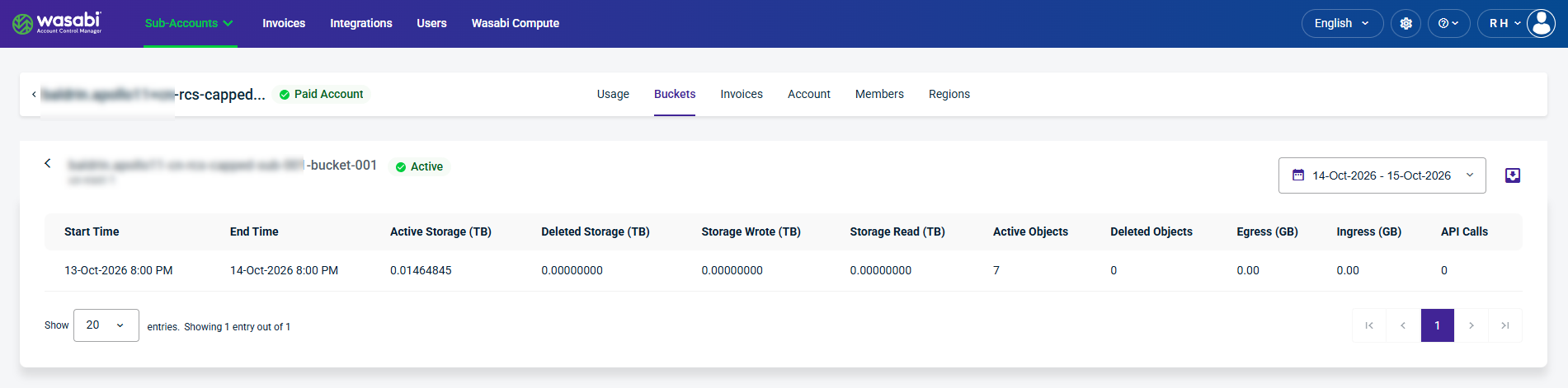
Table Column Details
Start Time—The beginning of the reporting period.
End Time—The end of the reporting period.
Active Storage (TB)—The amount of storage consumed by active objects in the bucket, measured in terabytes.
Deleted Storage (TB)—The amount of storage associated with deleted objects, measured in terabytes.
Storage Wrote (TB)—The volume of data written to the bucket during the reporting period, measured in terabytes.
Storage Read (TB)—The volume of data read from the bucket during the reporting period, measured in terabytes.
Active Objects—The number of active objects stored in the bucket.
Deleted Objects—The number of deleted objects recorded for the bucket.
Egress (GB)—The volume of data transferred out of Wasabi storage, measured in gigabytes.
Ingress (GB)—The volume of data transferred into Wasabi storage, measured in gigabytes.
API Calls—The number of API requests recorded for the bucket during the reporting period.
Date Selector
The calendar dropdown lets you select a specific Record Date to filter account data.
Export Data
The export tool lets you filter results and export data to CSV, JSON, or Excel.

Show Entries
Select the number of entries to display per page. This widget also indicates the number of entries currently displayed and the total number of available entries.
