You can set one of two types of compliance frameworks using a Wasabi wizard:
Law Enforcement Data Protection to establish the best practices to align your account security posture with the Law Enforcement Data Protection Framework.
Healthcare Security and Privacy to establish the best practices to align your account security posture with the Healthcare Security and Privacy Framework.
Completion of either wizard does not guarantee compliance or certification.
Click Security on the Wasabi menu.
Click Compliance Wizard.
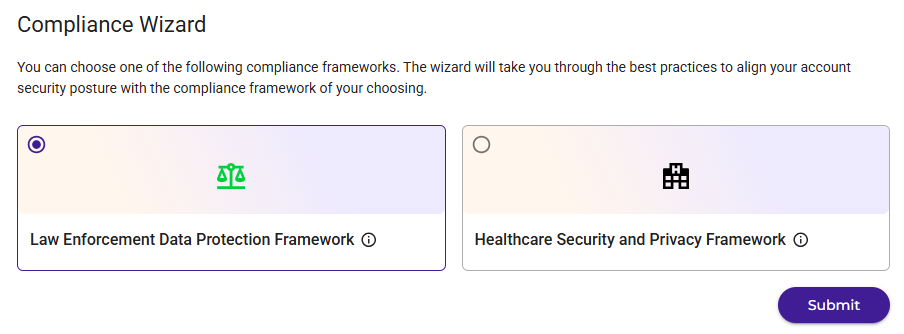
Click either framework button.
Click Submit.
Depending on the framework you selected, you will see the Wasabi wizard.
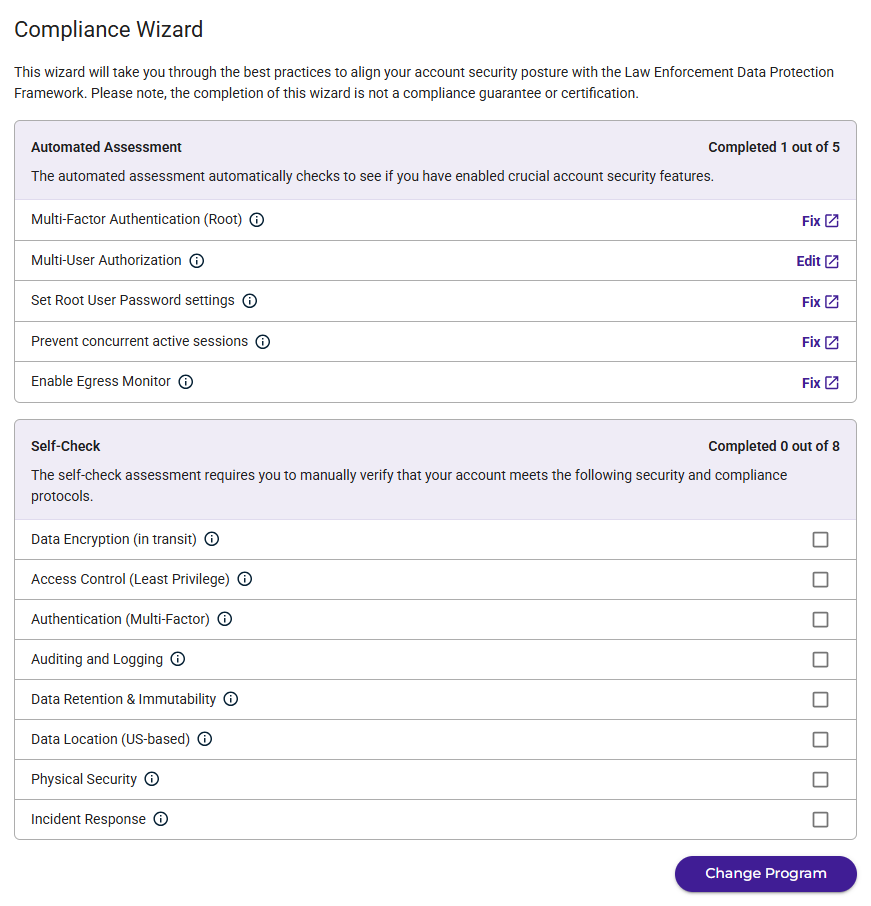
The Law Enforcement Data Protection Framework wizard is:
The Healthcare Security and Privacy Framework wizard is:
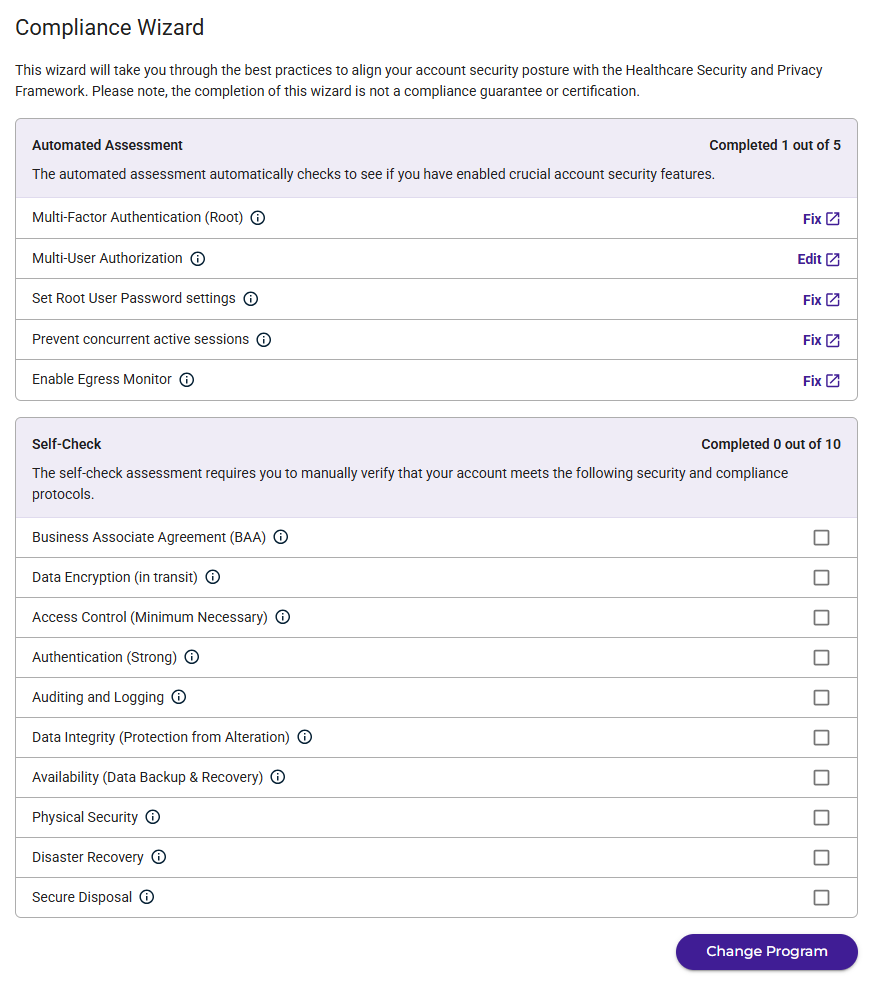
For either Framework, Automated Assessment features are listed:
Multi-Factor Authentication (Root)—Use a virtual MFA device to generate an authentication code. Account access is granted only after a user successfully provides this code as identity evidence on an authentication device such as a smartphone. Refer to MFA (Multi-Factor Authentication) for details.
Multi-User Authorization—Use the MUA feature to invite security contacts to sign off on sensitive account activities. Refer to MUA (Multi-User Authorization) for details.
Set Root User Password settings—Select Root user password settings to increase the default difficulty and security standards around your Root user password. Refer to Root Password Settings for details.
Prevent concurrent active sessions—Prevent multiple sessions from occurring at the same time. Refer to Advanced Security Options for details.
Enable Egress Monitor—Use the Egress Monitor to review your daily egress for suspicious activity. Your historical egress is used as a baseline for suspicious activity. You will receive alerts about this activity when the Email Notification toggle is enabled. Refer to Notifications: Enabling Email Reporting for details.
When Edit appears to the right of the feature, the feature is already established, and you can click Edit to change its settings. When Fix appears, the feature is not established, and you can click Fix to set it.
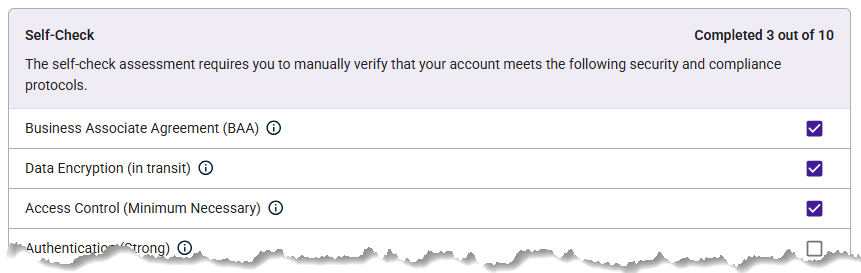
Review the Self-Check section for your framework. After you verify a security/compliance protocol, click to check the feature. For example:
Self-Check assessments for the Law Enforcement Data Protection Framework are:
Data Encryption—Ensure client-side applications use HTTPS for all connections.
Access Control (Least Privilege)—Restrict access to CJI based on job function. Use IAM policies to enforce least privilege.
Authentication (Multi-Factor)—Enable MFA for all sub-users accessing CJI, especially those with delete or modify permissions.
Auditing and Logging—Enable bucket logging to capture all requests. Integrate with SIEM for analysis and retention.
Data Retention & Immutability—Prevent accidental or malicious deletion/modification of CJI. Use Covert Copy or Object Lock Compliance mode for strict immutability.
Data Location (US-based)—Store your data within the continental United States.
Physical Security—Review Wasabi Security Center documentation.
Incident Response—Ensure your incident response plan accounts for data stored in Wasabi.
Self-Check assessments for the Healthcare Security and Privacy Framework are:
Business Associate Agreement (BAA)—Execute the BAA (HIPAA Business Associate Agreement) with Wasabi.
Data Encryption (in transit)—Ensure all applications handling PHI use secure connections.
Access Control (Minimum Necessary)—Implement strict access controls based on job roles. Regularly review and update permissions.
Authentication (Strong)—Enable MFA for all sub-users accessing PHI, especially those with administrative privileges.
Auditing and Logging—Enable bucket logging to capture all access to PHI. Implement a robust audit trail and review the process.
Data Integrity (Protection from Alteration)—Prevent unauthorized alteration or destruction of PHI. Use Covert Copy or Object Lock Compliance mode for strict immutability.
Availability (Data Backup & Recovery)—Utilize bucket versioning to recover from accidental deletion.
Physical Security—Review Wasabi Security Center documentation.
Disaster Recovery—Ensure your disaster recovery plan addresses PHI stored in Wasabi.
Secure Disposal—Ensure PHI is securely and permanently deleted when it is no longer required, in accordance with HIPAA.
When you end work on the framework wizard, you can just continue with other work. When you return to the framework (Security, Compliance Wizard), it will be displayed as you left it.
If you click Change Program, you can change to the other framework. However, you will lose any work settings on the current framework.