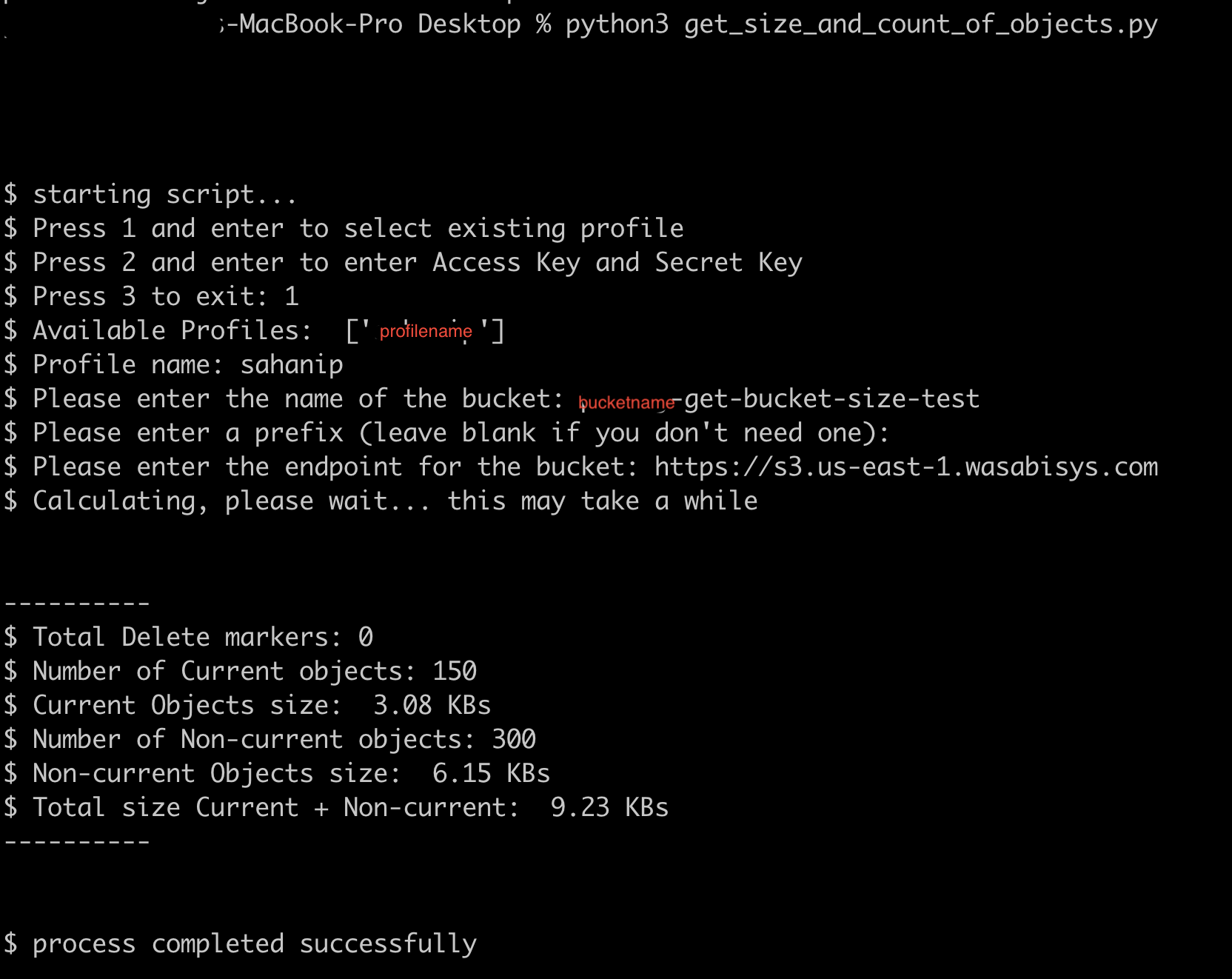
Some S3 applications/tools recognize the Wasabi Versioning feature and enable you to check the total size of current and non-current objects.
For a Windows system, you can use the S3 Browser application. In the following example, the total size of current objects is highlighted in red on the right, and the total size of current plus non-current objects is shown at the bottom of the screen.
Because no S3 application for macOS or Linux has a native feature to show this Information, you can use a Python script to get the total size of current and non-current versioned objects.
Make sure you have installed AWS SDK boto3 for Python on your CLI and turned off the versioning feature on your bucket before running the script.
Install Python 3+ version to run this script.
To get the total size of current and non-current objects in a bucket:
Download and run the script (which is also shown at the end of this article):
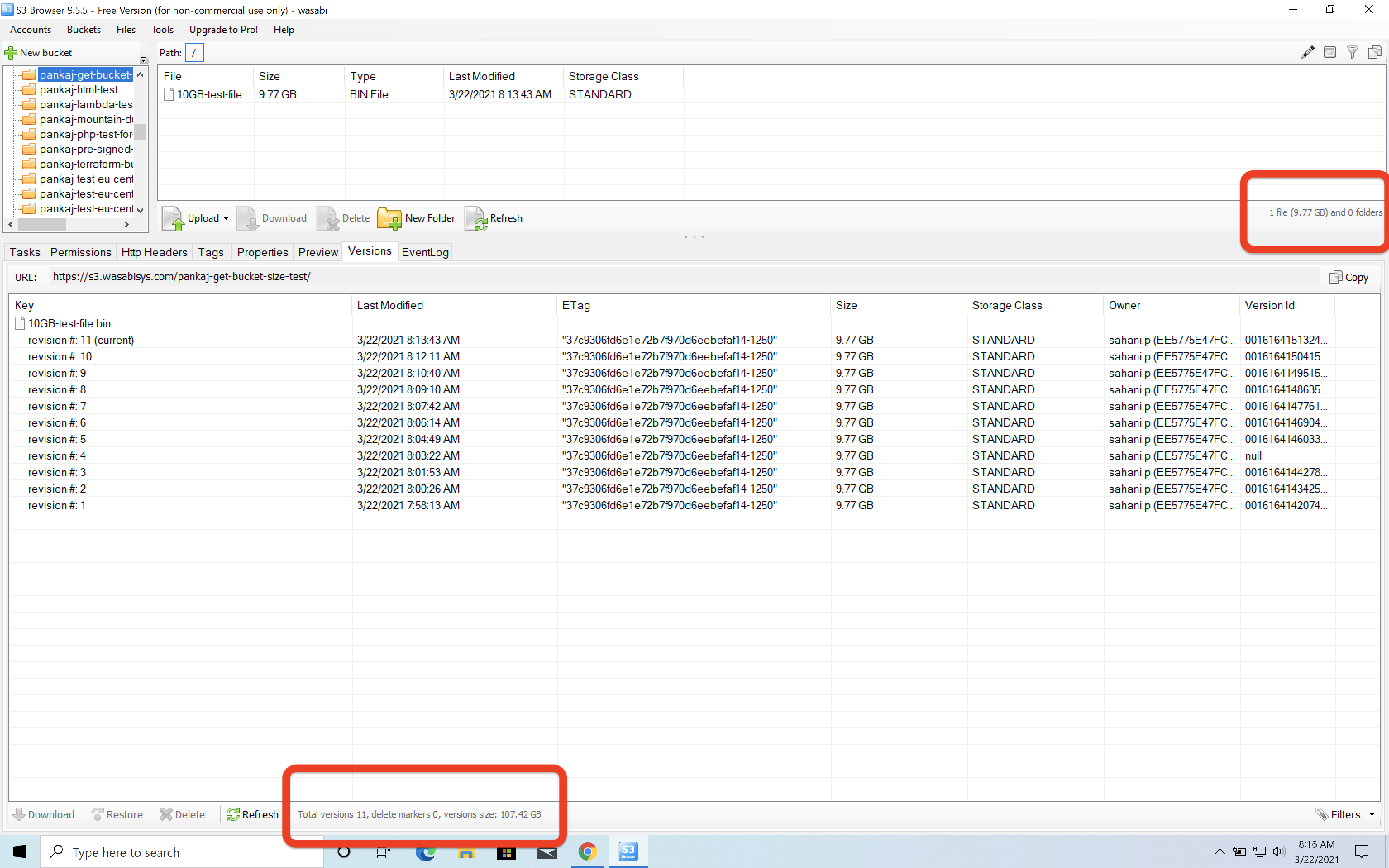
When you execute the script, it will prompt you to select the profile or enter the API keys of the administrator who is executing this script
If you already have a profile configured on your CLI, enter 1. (You can configure the AWS CLI profile for the Wasabi account using the Wasabi keys before running the script.)
Optionally, you can use credential files to run your code, but it is always a best practice to use such implementation wherein your credential keys are in a file stored on your local machine (rather than being part of your actual code or entering keys at the runtime prompt). In the following example, the profile name is profilename in the ~/.aws/credentials file.
If you do not want to use the existing profile, enter 2 and enter your API keys.

Enter your bucket name (bucketname-get-bucket-size-test, in the example below).
Optionally, enter a prefix. If you do, be sure to enter the full prefix path (excluding the bucket name).
Indicate the region in which the bucket is stored (us-east-1, in the example).

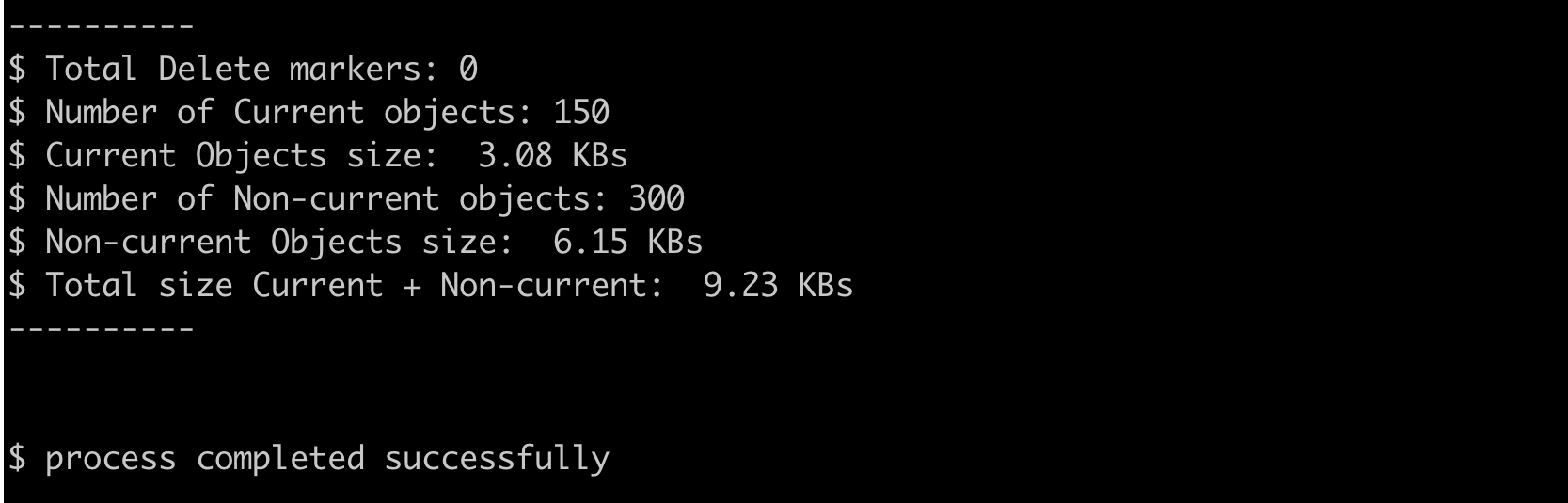
The script will calculate and display:
Total number of delete markers (if present)
Total number of current objects (if present)
Total size of all current objects
Total number of non-current objects (if present)
Total size of all non-currrent objects
Total size of all current and non-currrent objects
In summary, the Python script is:
# Copyright (c) 2021. This script is available as fair use for users. This script can be used freely with Wasabi
        # Technologies LLC. Distributed by the support team at Wasabi Technologies.

        """
        Overview
        This Script will take the following inputs:
        1. profile name / Access key and Secret Key
        2. Bucket name
        3. region
        4. Prefix

        Calculate the size and count of the total number of delete markers, current and non current objects.
        """

        import sys
        from boto3 import client, Session
        from botocore.exceptions import ProfileNotFound, ClientError


        def calculate_size(size, _size_table):
        """
        This function dynamically calculates the right base unit symbol for size of the object.
        :param size: integer to be dynamically calculated.
        :param _size_table: dictionary of size in Bytes. Created in wasabi-automation.
        :return: string of converted size.
        """
        count = 0
        while size // 1024 > 0:
        size = size / 1024
        count += 1
        return str(round(size, 2)) + ' ' + _size_table[count]


        def get_credentials():
        """
        This function gets the access key and secret key by 2 methods.
        1. Select profile from aws credentials file.
        Make sure that you have run AWS config and set up your keys in the ~/.aws/credentials file.
        2. Insert the keys directly as a string.
        :return: access key and secret key
        """
        credentials_verified = False
        aws_access_key_id = None
        aws_secret_access_key = None
        while not credentials_verified:
        choice = input("$ Press 1 and enter to select existing profile\n"
        "$ Press 2 and enter to enter Access Key and Secret Key\n"
        "$ Press 3 to exit: ")
        if choice.strip() == "1":
        aws_access_key_id, aws_secret_access_key = select_profile()
        if aws_access_key_id is not None and aws_secret_access_key is not None:
        credentials_verified = True
        elif choice.strip() == "2":
        aws_access_key_id = input("$ AWS access key").strip()
        aws_secret_access_key = input("$ AWS secret access key").strip()
        credentials_verified = True
        elif choice.strip() == "3":
        sys.exit(0)
        else:
        print("Invalid choice please try again")
        return aws_access_key_id, aws_secret_access_key


        def select_profile():
        """
        sub-function under get credentials that selects the profile form ~/.aws/credentials file.
        :return: access key and secret key
        """
        profile_selected = False
        while not profile_selected:
        try:
        profiles = Session().available_profiles
        if len(profiles) == 0:
        return None, None
        print("$ Available Profiles: ", profiles)
        except Exception as e:
        print(e)
        return None, None
        profile_name = input("$ Profile name: ").strip().lower()
        try:
        session = Session(profile_name=profile_name)
        credentials = session.get_credentials()
        aws_access_key_id = credentials.access_key
        aws_secret_access_key = credentials.secret_key
        profile_selected = True
        return aws_access_key_id, aws_secret_access_key
        except ProfileNotFound:
        print("$ Invalid profile. Please Try again.")
        except Exception as e:
        raise e


        def region_selection():
        """
        This function presents a simple region selection input. Pressing 1-5 selects the corresponding region.
        :return: region
        """
        region_selected = False
        _region = ""
        while not region_selected:
        _choice = input("$ Please enter the endpoint for the bucket: ").strip().lower()
        if len(_choice) > 0:
        _region = _choice
        region_selected = True
        return _region


        def create_connection_and_test(aws_access_key_id: str, aws_secret_access_key: str, _region, _bucket):
        """
        Creates a connection to wasabi endpoint based on selected region and checks if the access keys are valid.
        NOTE: creating the connection is not enough to test. We need to make a method call to check for its working status.
        :param aws_access_key_id: access key string
        :param aws_secret_access_key: secret key string
        :param _region: region string
        :param _bucket: bucket name string
        :return: reference to the connection client
        """
        try:
        _s3_client = client('s3',
        endpoint_url=_region,
        aws_access_key_id=aws_access_key_id,
        aws_secret_access_key=aws_secret_access_key)

        # Test credentials are working
        _s3_client.list_buckets()

        try:
        _s3_client.head_bucket(Bucket=bucket)
        except ClientError:
        # The bucket does not exist or you have no access.
        raise Exception("$ bucket does not exist in the account please re-check the name and try again: ")

        return _s3_client

        except ClientError:
        print("Invalid Access and Secret keys")
        except Exception as e:
        raise e
        # cannot reach here
        return None


        if __name__ == '__main__':
        # Generate a table for SI units symbol table.
        size_table = {0: 'Bs', 1: 'KBs', 2: 'MBs', 3: 'GBs', 4: 'TBs', 5: 'PBs', 6: 'EBs'}

        print("\n")
        print("\n")
        print("$ starting script...")

        # generate access keys
        access_key_id, secret_access_key = get_credentials()

        # get bucket name
        bucket = input("$ Please enter the name of the bucket: ").strip()

        # prefix
        prefix = input("$ Please enter a prefix (leave blank if you don't need one): ").strip()

        # get region
        region = region_selection()

        # test the connection and access keys. Also checks if the bucket is valid.
        s3_client = create_connection_and_test(access_key_id, secret_access_key, region, bucket)

        # create a paginator with default settings.
        object_response_paginator = s3_client.get_paginator('list_object_versions')
        if len(prefix) > 0:
        operation_parameters = {'Bucket': bucket,
        'Prefix': prefix}
        else:
        operation_parameters = {'Bucket': bucket}

        # initialize basic variables for in memory storage.
        delete_marker_count = 0
        delete_marker_size = 0
        versioned_object_count = 0
        versioned_object_size = 0
        current_object_count = 0
        current_object_size = 0

        print("$ Calculating, please wait... this may take a while")
        for object_response_itr in object_response_paginator.paginate(**operation_parameters):
        if 'DeleteMarkers' in object_response_itr:
        for delete_marker in object_response_itr['DeleteMarkers']:
        delete_marker_count += 1

        if 'Versions' in object_response_itr:
        for version in object_response_itr['Versions']:
        if version['IsLatest'] is False:
        versioned_object_count += 1
        versioned_object_size += version['Size']
        elif version['IsLatest'] is True:
        current_object_count += 1
        current_object_size += version['Size']

        print("\n")
        print("-" * 10)
        print("$ Total Delete markers: " + str(delete_marker_count))
        print("$ Number of Current objects: " + str(current_object_count))
        print("$ Current Objects size: ", calculate_size(current_object_size, size_table))
        print("$ Number of Non-current objects: " + str(versioned_object_count))
        print("$ Non-current Objects size: ", calculate_size(versioned_object_size, size_table))
        print("$ Total size Current + Non-current: ",
        calculate_size(versioned_object_size + current_object_size, size_table))
        print("-" * 10)
        print("\n")

        print("$ process completed successfully")
        print("\n")
        print("\n")
This is an example of the entire output displayed by the script: