My Profile is a WACM interface component that enables Wasabi Admins to view and manage their profile information across all WACM account types, including identity details, assigned roles, and other attributes that determine access and permissions. Changes to My Profile apply only to the signed-in user and do not affect other users or account settings.
Think of My Profile, Account, and User profiles as different views of the same underlying WACM data, filtered by who you are and what you’re allowed to manage.
Feature availability depends on your assigned user role and access permissions. Some functionality may not be visible or accessible to all users.
Accessing My Profile
When you sign in to WACM as Wasabi Admin, click your username in the navigation menu and select My Profile from the dropdown. The Profile page is displayed.
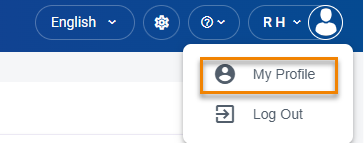
Profile Menu
My Profile provides the following profile views: