WACM employs a hierarchical, multi-account structure. Depending on the deployment type, various account types may be present at different levels. To maintain consistency, documentation uses standardized tier names to specify hierarchy levels.
Documentation Links
For detailed information on the different WACM account types, refer to the following product guides:
WACM Hierarchy Diagram
The diagram below shows the possible hierarchy of account types within a WACM deployment with Account Governance enabled. The tiers shown represent the entire model; however, not all tiers appear in every deployment setup.
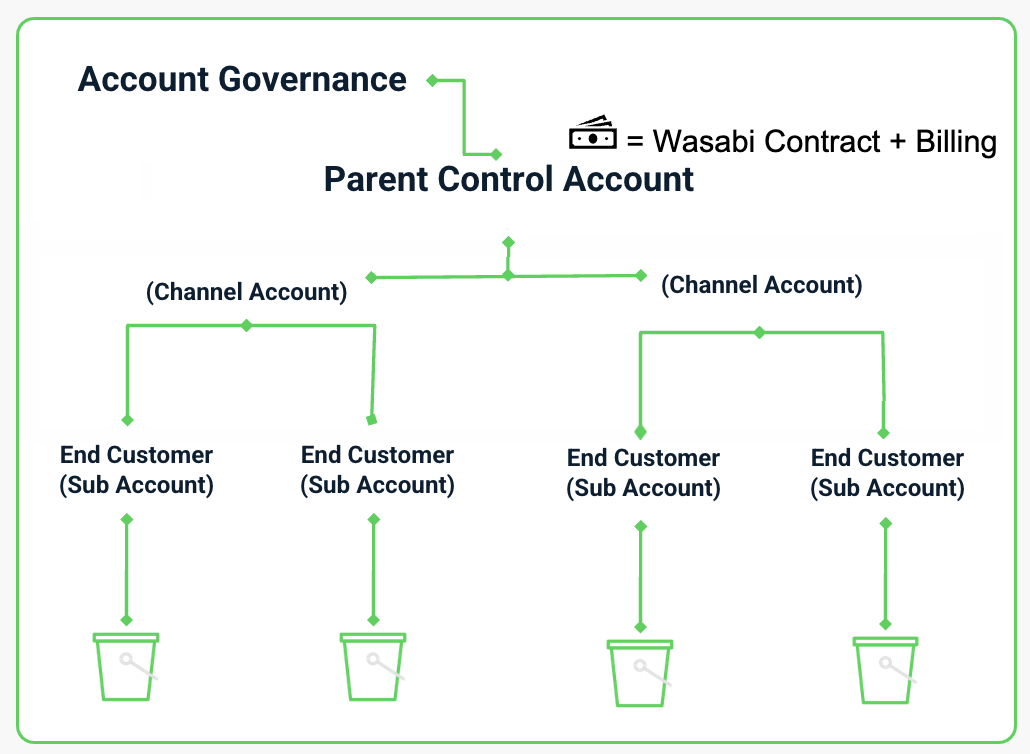
Governance Tier (Optional)
Tier 0 - Account Governance
Tier 0 offers cross-hierarchy oversight when Account Governance is active. It enables administrators to enforce policies and maintain visibility across multiple Tier 1 Parent Accounts. Tier 0 is present only in deployments that require centralized governance across multiple account hierarchies.
A Governance Account can manage any account level. Users with Account Governance tier access can manage multiple Control Accounts and have a broader range of roles and permissions than Control Account users, enabling greater customization for your WACM use case.
Parent Tier
Tier 1 - Control Accounts and Distributor Accounts
Tier 1 represents the highest level of administrative authority within a hierarchy. Depending on the deployment model, Tier 1 may be a Control Account (for enterprise deployment) or a Distributor Account (for Channel deployment). Tier 1 manages subordinate accounts (Sub-Accounts, Resellers, MSPs), enforces access controls, and consolidates reporting and usage visibility.
Partner Tier / Delegated
Tier 2 - Channel Accounts for Resellers and MSPs
Tier 2 only exists in channel-based deployments. It includes Reseller or MSP Accounts that oversee downstream Tier 3 Sub-Accounts. Tier 2 offers delegated administration while functioning within the governance and structure of Tier 1.
Operational Tier
Tier 3 - Sub-Accounts
Tier 3 includes Sub-Accounts (End Customer / Linked Accounts). These accounts are the operational environments where storage resources are created and used. They generate usage and billing data and follow the governance and access controls set by a Tier 1 account (and the Tier 0 account, if enabled).